A single, navigable view of upstream, midstream and downstream operations, built to support leadership analysis.
RoleLead UX Designer
Duration4 months
TeamProject Manager, Business Analysts, 2 Data Analysts, Designer, 3 Developers, and QA Engineers
SectorEnergy · Oil & Gas
The problem
Leadership lacked a single view of how upstream, midstream and downstream operations connect.
My contribution
Led discovery workshops, the information architecture, the map-first interaction model and the KPI system.
The result
Three value chain segments unified across eight interactive views, serving as one source of truth for strategy.
Impact at a glance
The map became the shared reference for how the business fits together and where it is exposed.
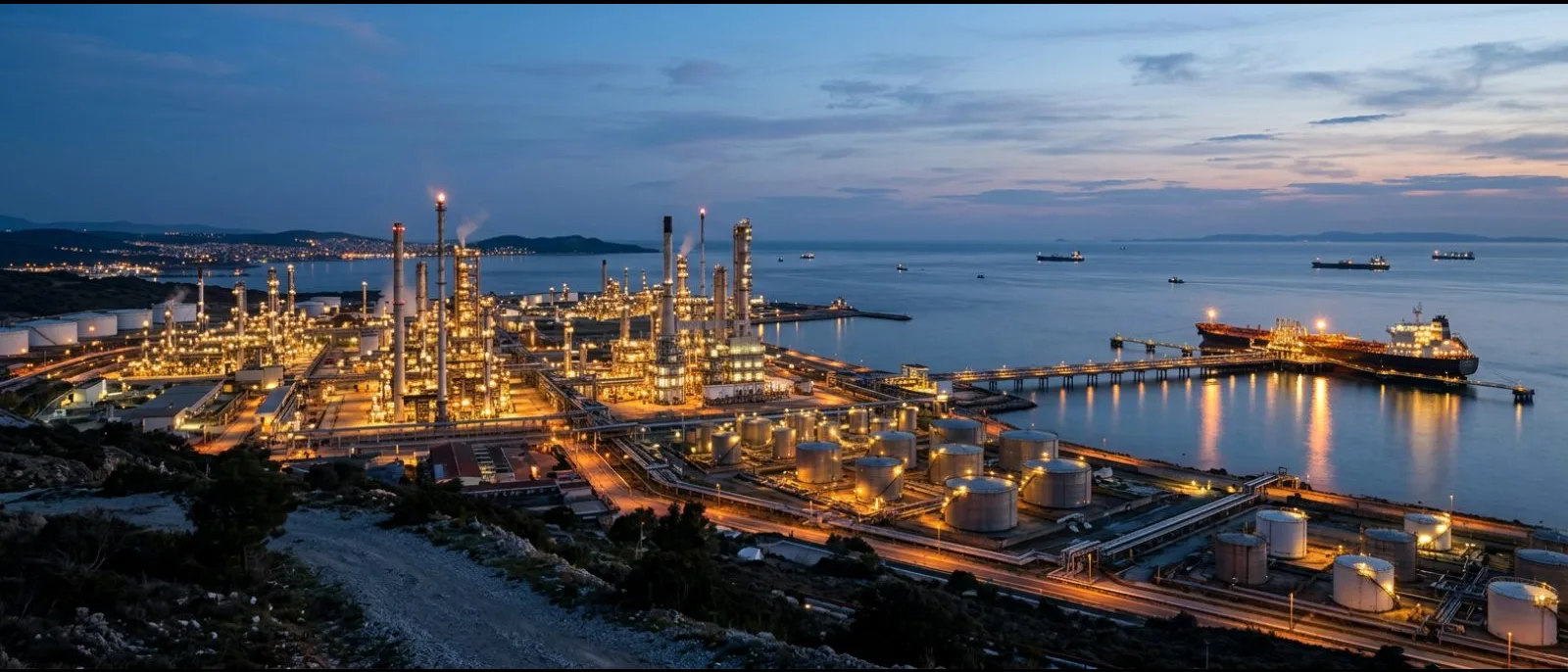
The Value Chain Map is a workflow diagram of a global oil and gas company's operations, from crude oil exploration through to retail delivery. It spans upstream, midstream and downstream activity, supported by subsidiaries and international joint ventures. Despite a dominant market position, the value proposition remains exposed to volatile oil prices, which respond to speculation and geopolitical events, and to disruptions that could affect supply continuity, price control and profitability.
3Value chain segments unified
8Interactive map views
1Source of truth for strategy
Key stage 01
Understanding the problem
The challenge
The company operates an end-to-end value chain covering exploration, transportation, and refining and distribution. Market volatility and threats to critical infrastructure could disrupt supply and weaken its competitive position. Leadership needed a clear, shared view of how each stage connects, so that risk could be understood and managed across the whole chain rather than within individual functions.
Market volatility Prices fluctuate with speculation and instability, which places the value proposition under pressure.
Critical infrastructure risk Attacks on assets or misinformation spreading through trading channels could disrupt supply continuity and price control.
Complexity Subsidiaries, joint ventures and three operating segments make it difficult to hold the whole business in a single mental model.
What I did
I held working sessions with the strategy office and the leads of each value-chain segment to agree what the map had to answer.
I audited the slide decks and spreadsheets that leadership already used and catalogued every KPI in them.
Before designing any screen, I mapped the six segments, from trading to retail, and the hand-offs between them.
Primary goal
Present the full chain, from well to retail, on one coherent canvas.
Personas and context
James Whitfield
Strategy Director · Corporate strategy office
Primary user
She prepares the quarterly value-chain review for the executive committee. Currently this involves consolidating decks from six segment teams in four countries.
Pain points
Each segment reports in its own format, so the material does not align.
No single view shows where value is created or lost along the chain.
Risk exposure is discussed from recollection rather than from data.
Goals
One map showing the whole chain, from well to pump.
Drilling from a country to a segment to a KPI in seconds.
A shared picture that the executive committee can debate.
Daniel Park
Refinery Operations Head · Process & Refine segment
Segment owner
He owns throughput, availability and margin for the refineries. He wants his numbers seen in context rather than as one page in another team's deck.
Pain points
Upstream supply issues appear in his KPIs without an upstream explanation.
Comparison of refineries and countries is done by hand.
Slide-based reporting is out of date on the day it is issued.
Goals
Visibility of his segment's inbound and outbound flows.
Side-by-side comparison of refineries, by product and period.
Live figures that the team trusts.
Key stage 02
Defining the structure before screen design
What we decided to build
The company moved to a digitally integrated value chain model that uses real-time analytics, automation and smart technologies to improve efficiency, manage risk and adapt to changing conditions. The map gives leadership a single view of this model, so that dependencies between stages are visible and decisions can be made with the full chain in mind.
Segment-by-segment map Upstream, midstream and downstream appear as connected stages with clear hand-offs between them.
Layered structure Subsidiaries and joint ventures are shown in relation to the core chain.
Risk and analytics overlays Real-time analytics, automation and smart-technology touchpoints are highlighted where they support resilience.
My role in this stage
As Lead UX Designer, I led the discovery workshops and defined the information architecture across countries and segments. I also designed the map-first interaction model and the KPI system, and worked with the Power BI developer through build and QA.
Information architecture, flows and wireframes
01
Information architecture
The structure moves from the global map to a country, then to one of six segments, then to KPIs. Every view keeps the same three layers: filters, a map or flow canvas, and a KPI rail.
02
User flow
A strategy reviewer can move from the world view to a single refinery's margin in four clicks, and return to the starting point without losing context.
03
Dashboard anatomy
I applied wireframe-level layout rules to every screen so that six segment teams could contribute data without breaking the experience.
Key stage 03
Designing, testing and shipping with the team
The design
The final views run in Power BI on a deep-blue canvas. This gives the map, the flow diagrams and the KPI cards one visual language across all six segments.
How we worked
Together with the Power BI developer, I converted the layout rules into reusable report templates.
I reviewed each segment's data with its owner before it entered the map.
I conducted walkthroughs with the strategy office and adjusted the KPI hierarchy after each one.
How the product works
Step 01
The whole value chain on one canvas
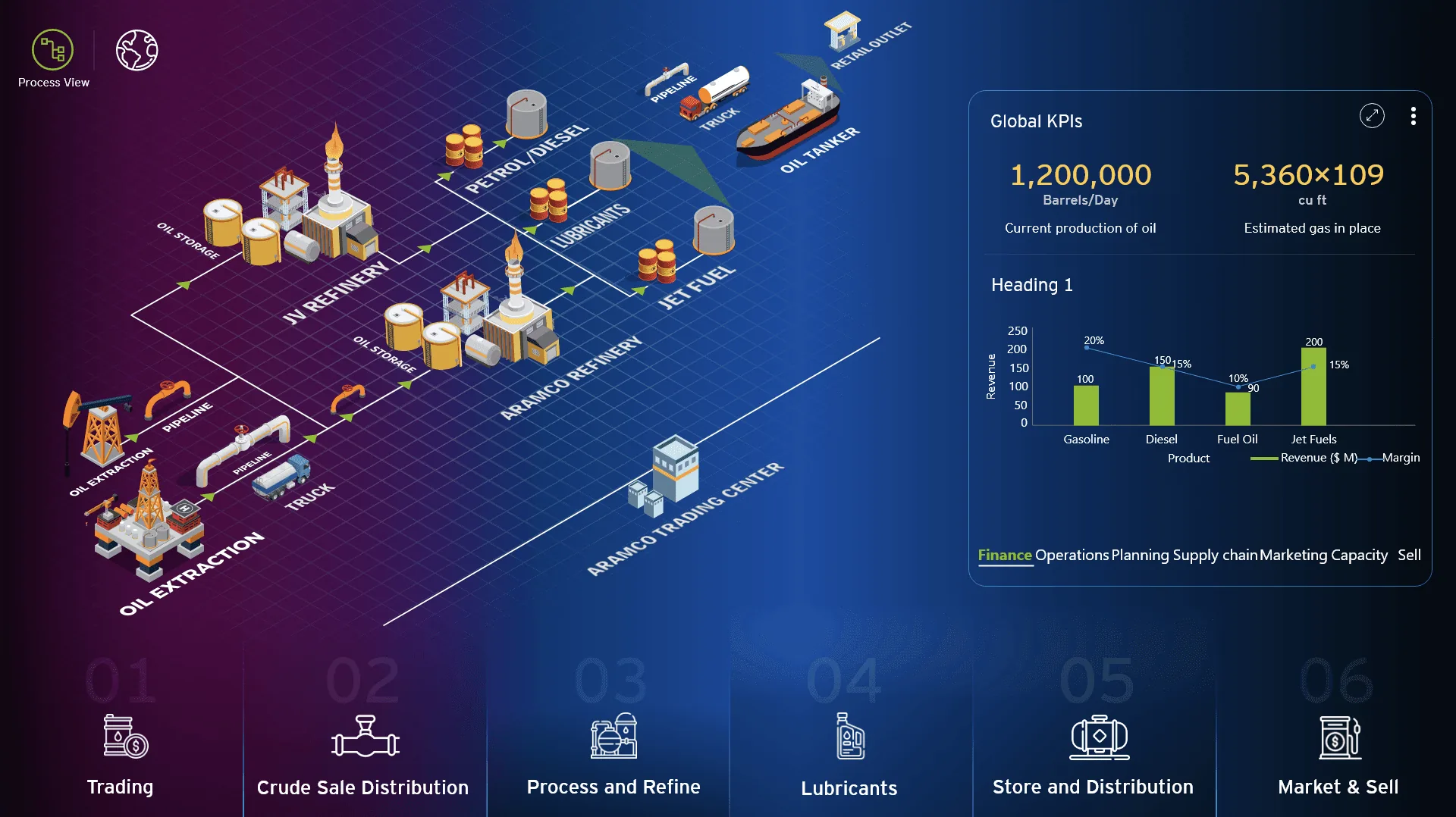
The landing view presents extraction, refining, storage, shipping and retail as one connected scene. The headline production KPIs sit beside it, so leadership starts from the overall picture.
Step 02
A global view of refining
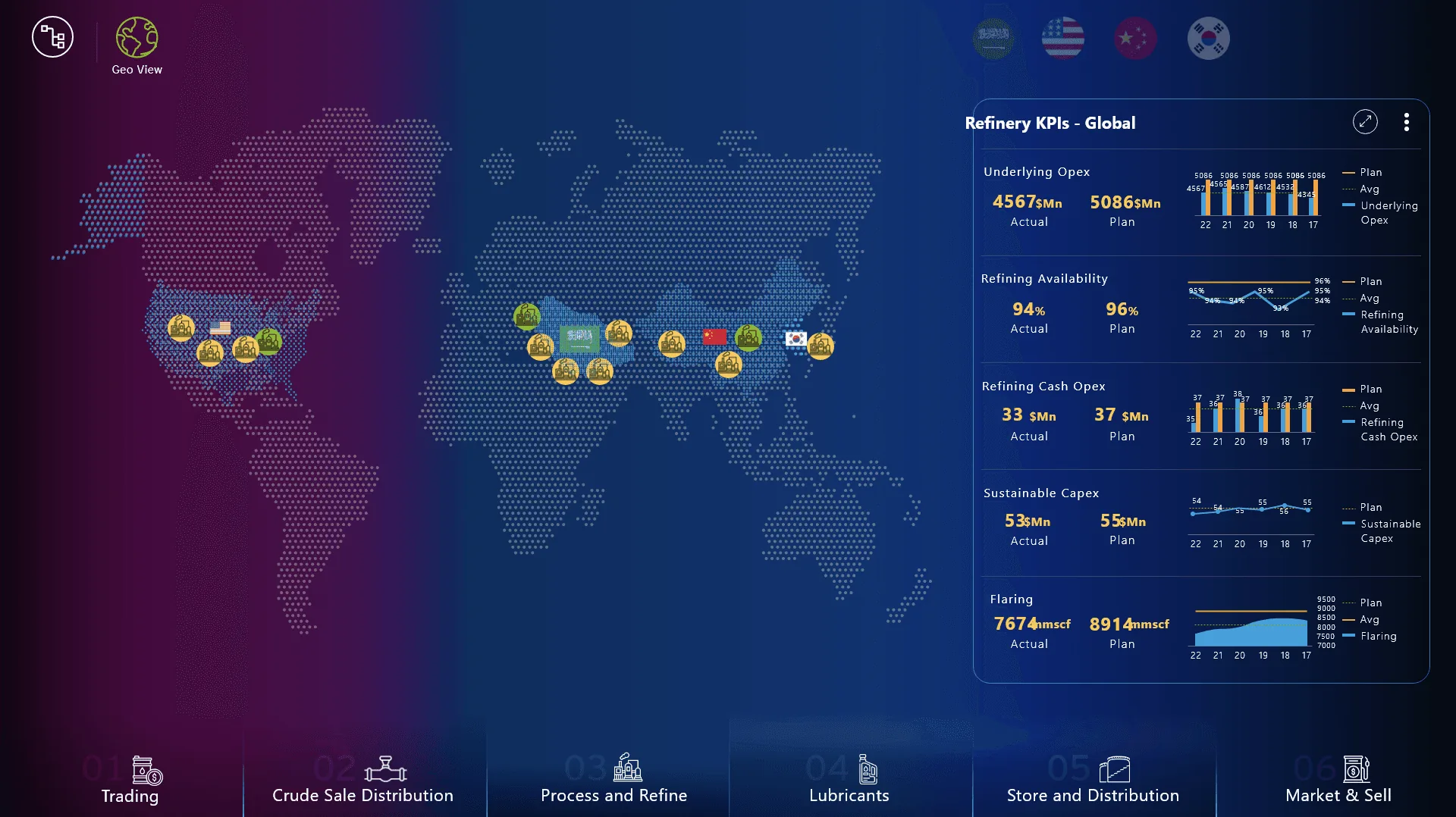
A world map places every refinery and trading hub. The KPI panel compares opex, availability, capex and flaring against plan for the whole portfolio.
Step 03
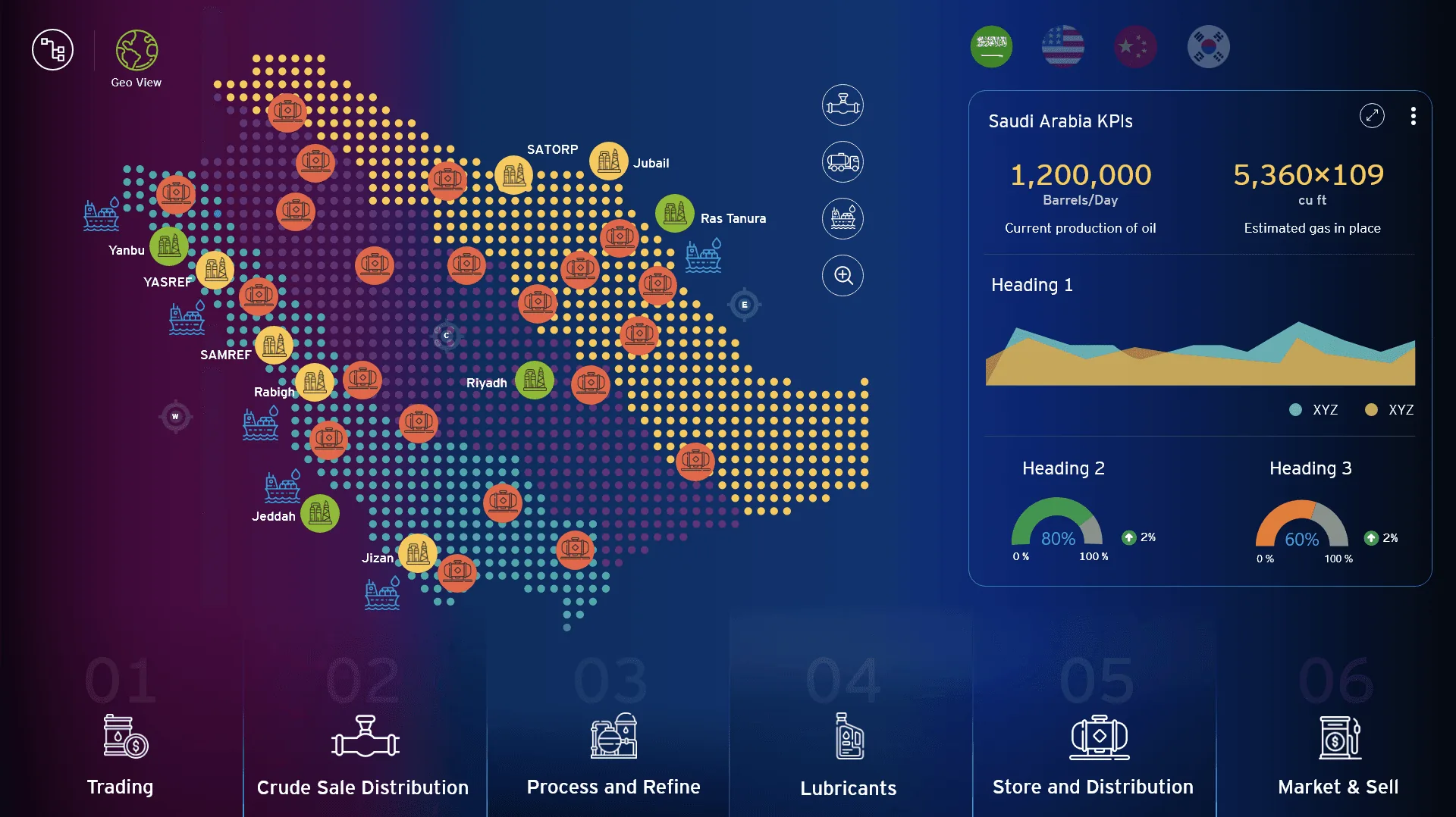
Drilling into one country
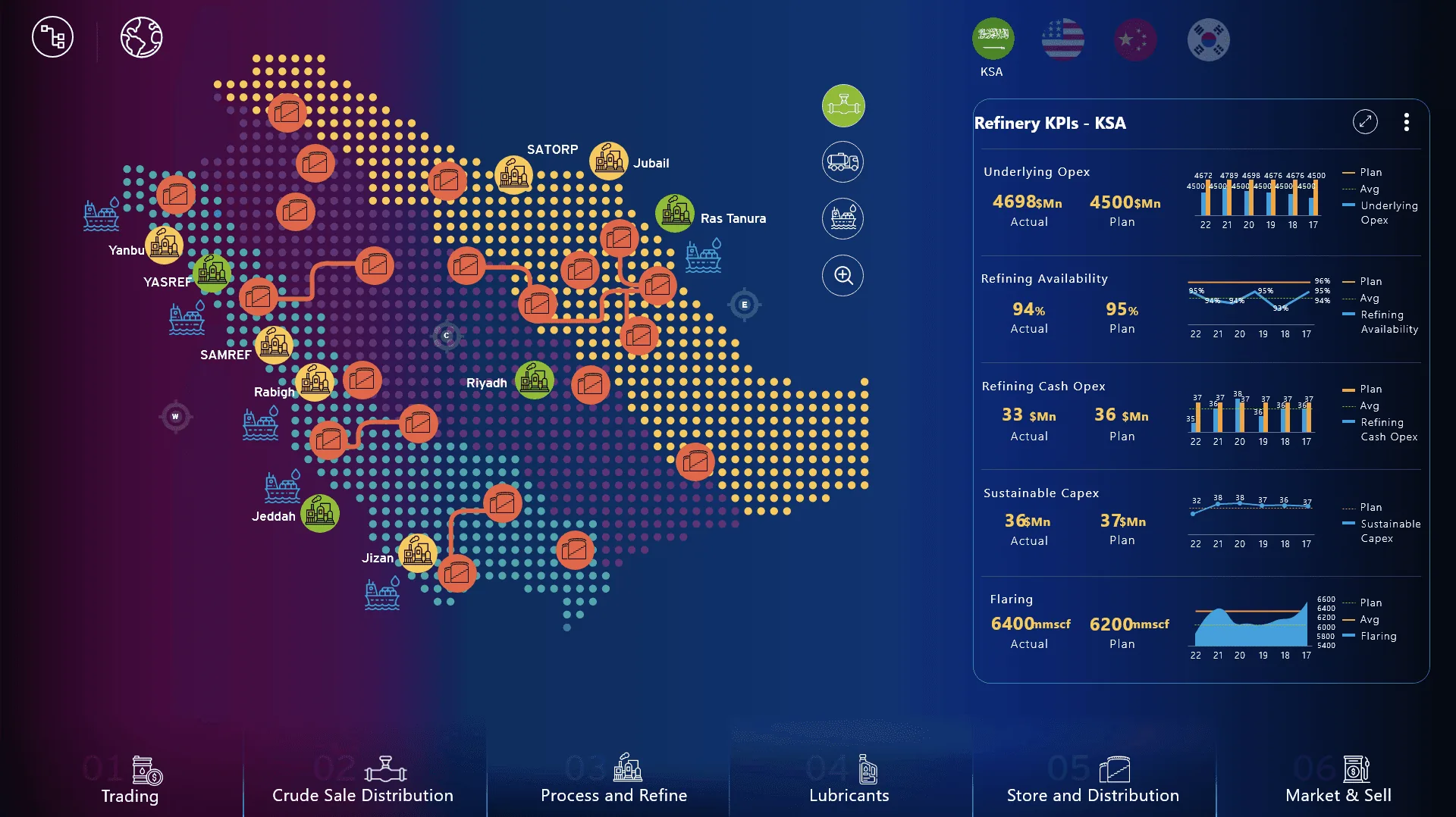
Selecting a country redraws the map with its sites and the routes between them. The KPI panel updates alongside, so the numbers stay tied to the selected context.
Step 04
Inside a single refinery
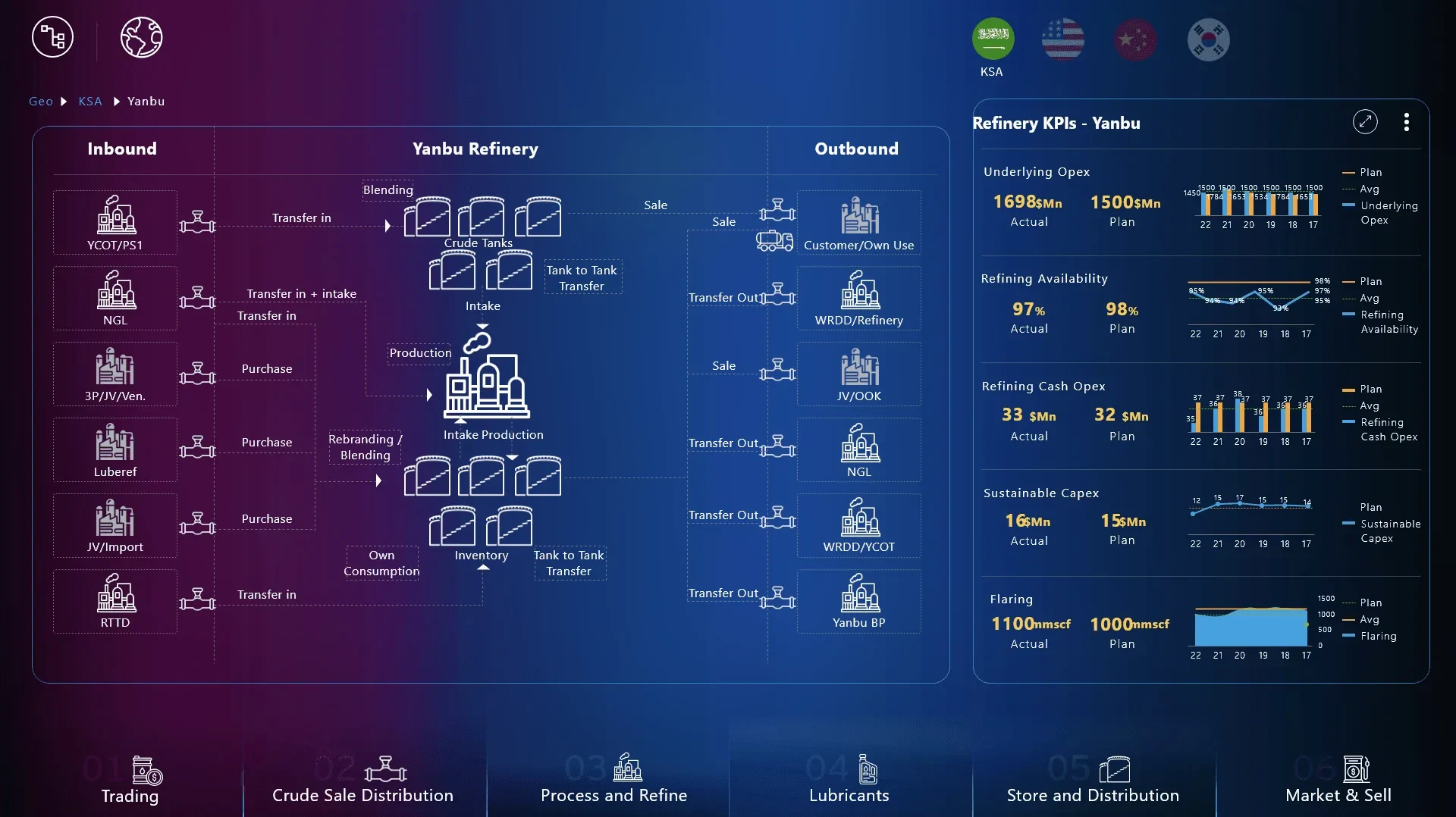
The refinery view shows inbound feedstock, blending, production and outbound transfers as a flow. This mirrors how operations teams already describe the plant.
Step 05
Segment KPIs at a glance
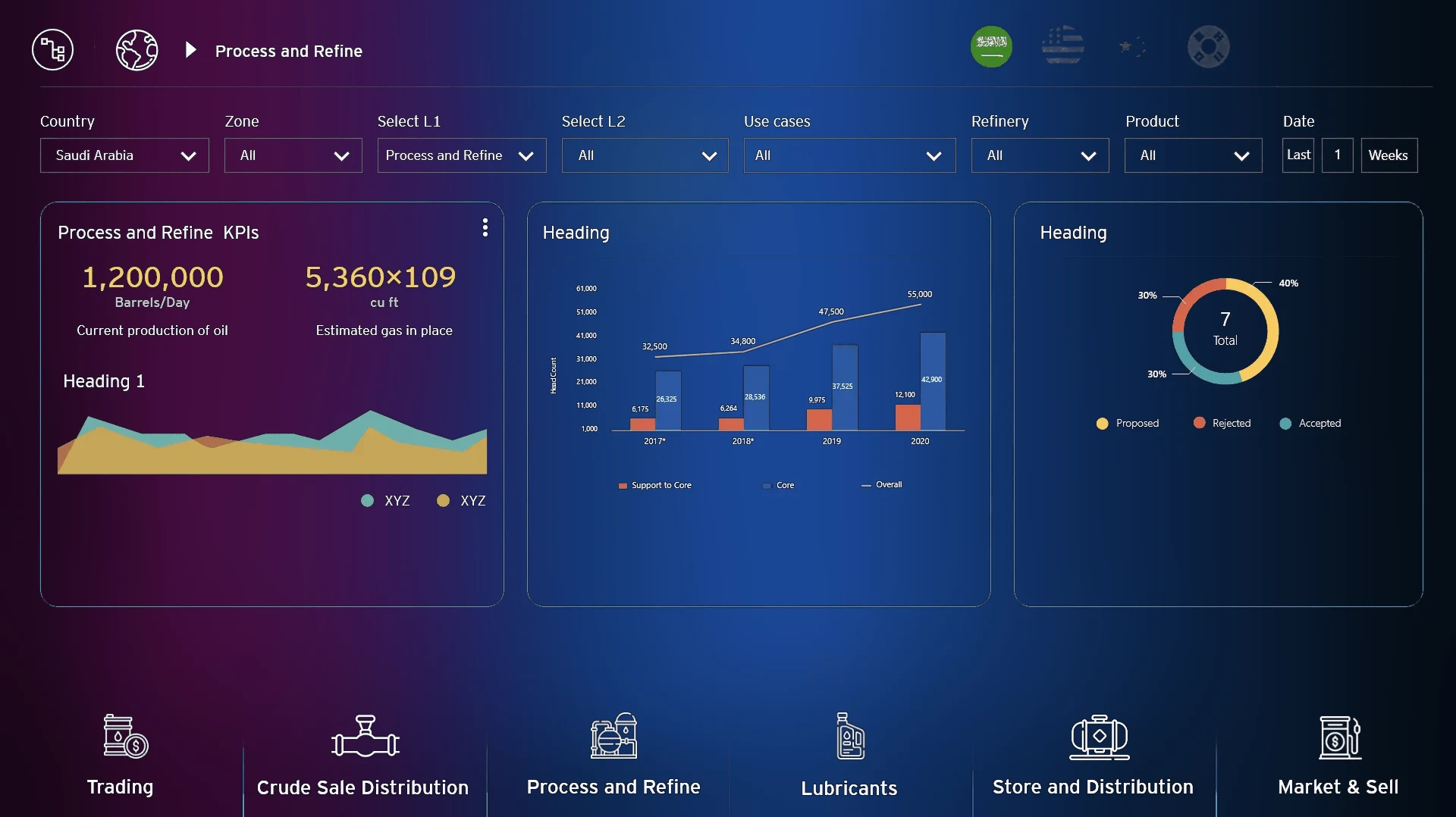
Each of the six segments on the bottom bar opens its own KPI view with the same filters. Moving between trading, refining and retail therefore feels like using one product.
Step 06
Storage and distribution in detail
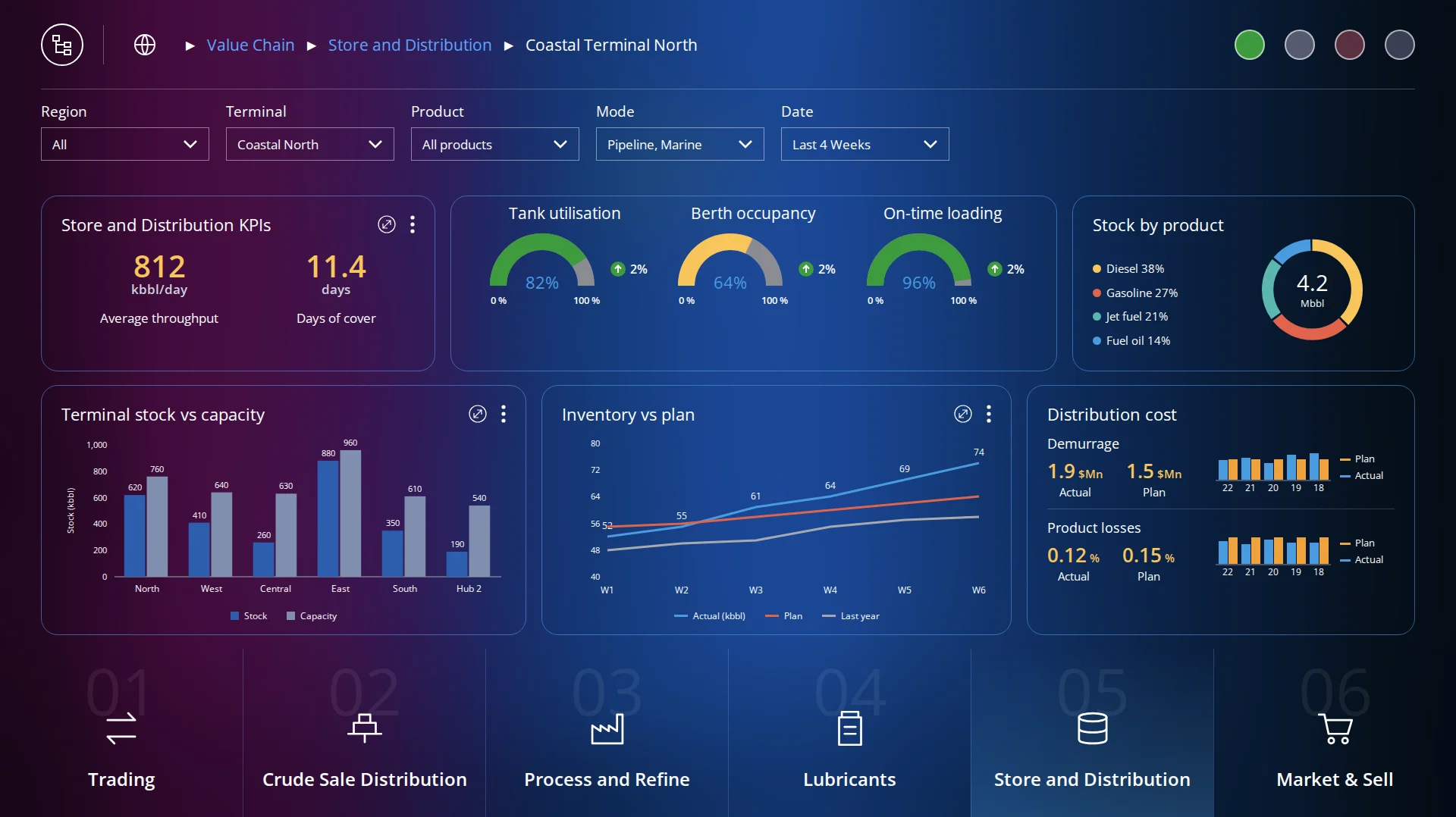
Throughput, tank and berth utilisation, stock by product and inventory against plan appear together, with demurrage and losses tracked against plan. Planners can address a capacity problem before it incurs cost.
Step 07
Linking operations to strategy
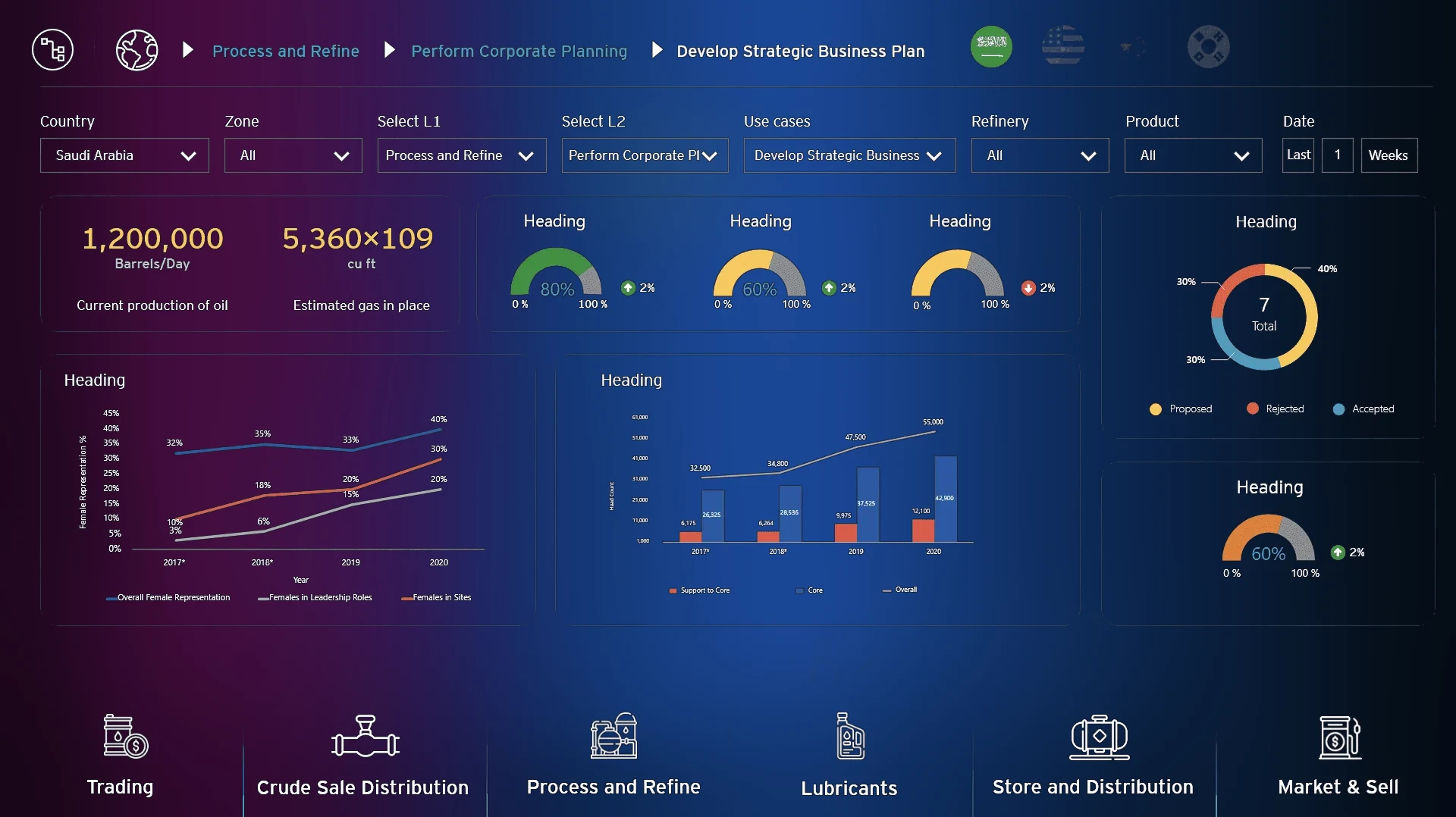
The strategic plan view sets targets and trends from the corporate plan against operating data. It gives the strategy office one place to test assumptions.
Step 08
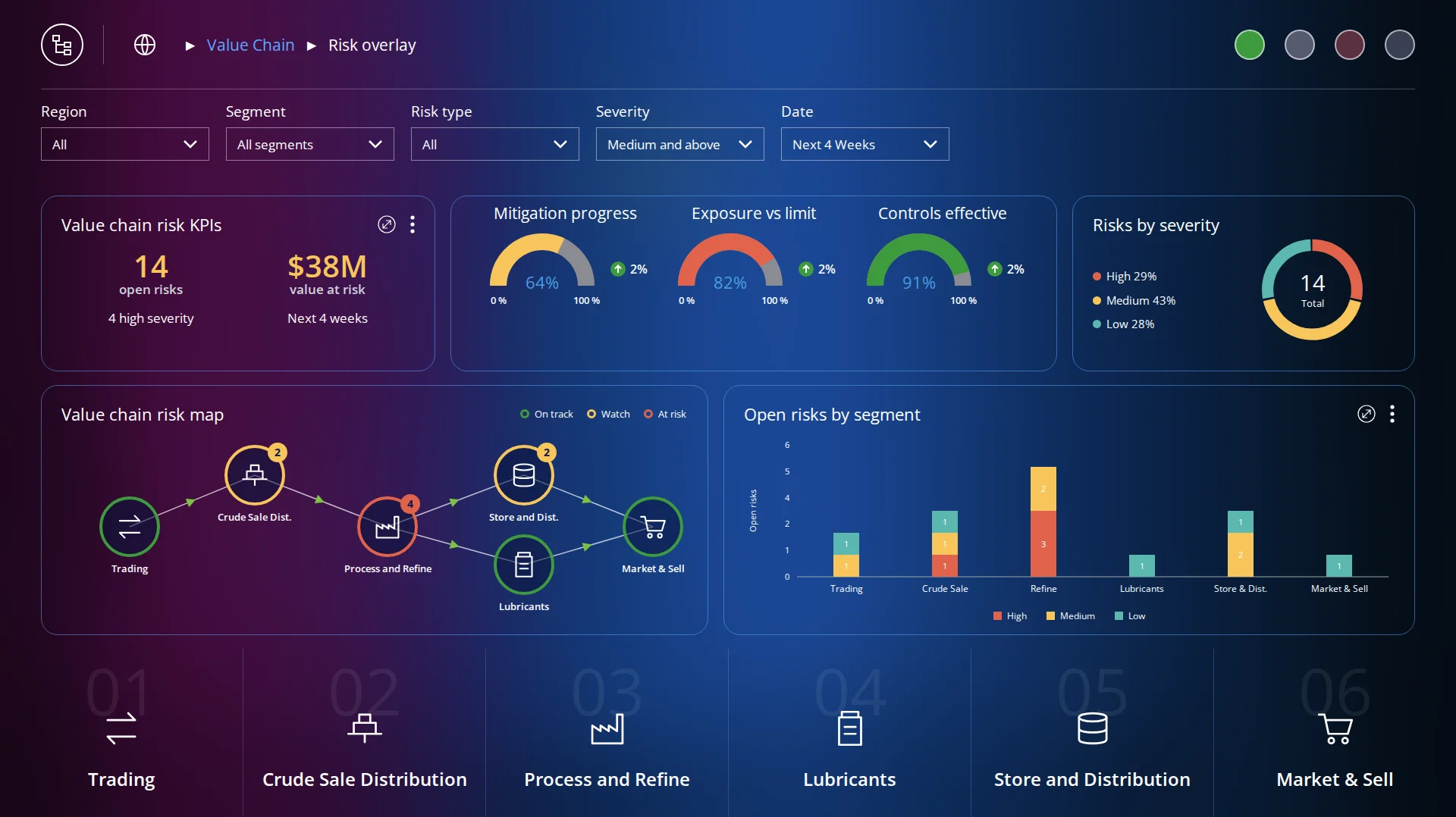
Seeing risk across the chain
A risk overlay colours each segment by status and shows how a disruption in refining flows through to storage and sales. Open risks are broken down by segment and severity.
Step 09
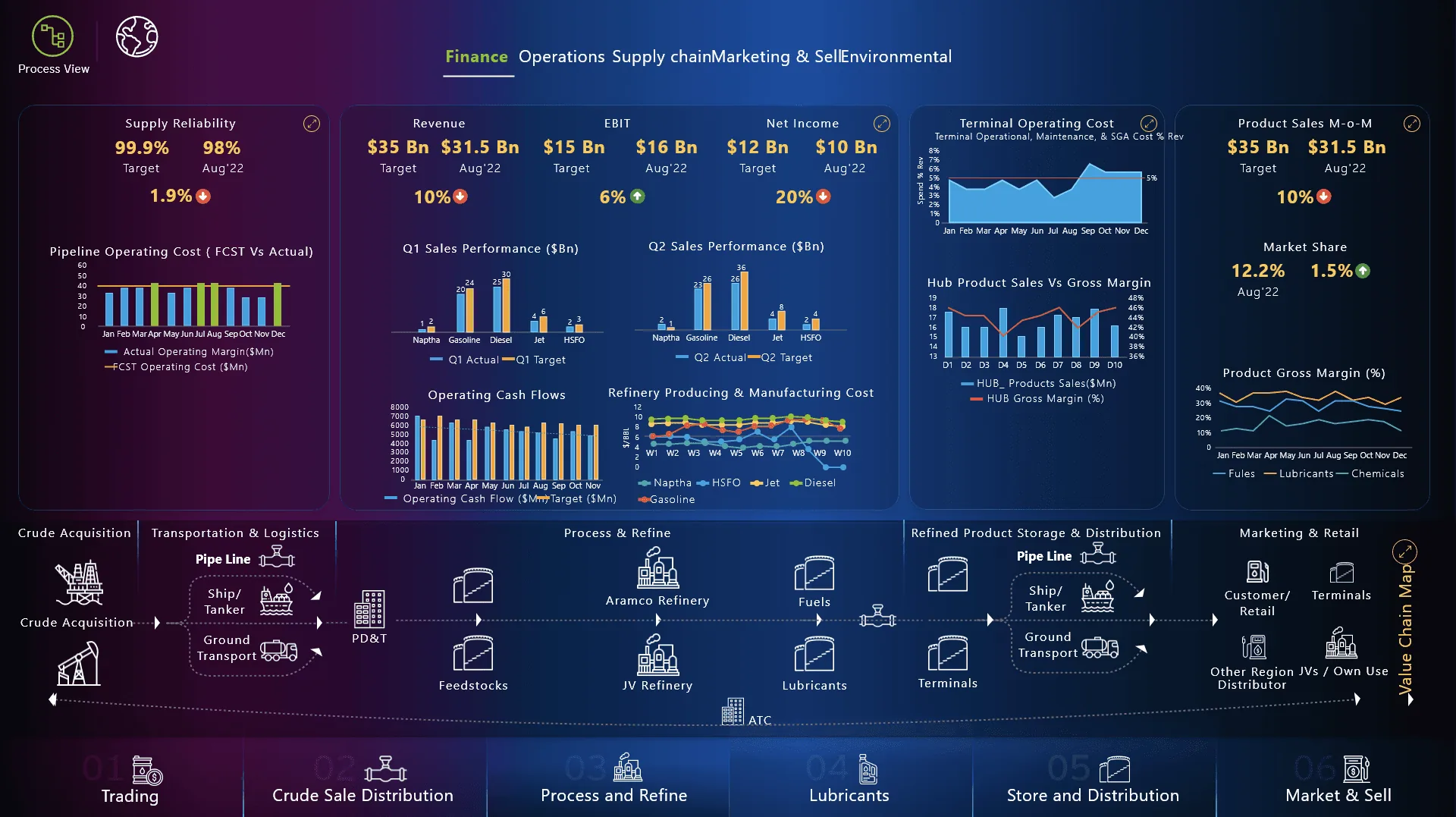
Finance and operations in the same view
The process view combines revenue, margin and operating cost with the end-to-end flow beneath. A financial question can be traced to the step that causes it.
More screens
Collaboration
How the team worked together
The team comprised six segments, two data analysts and a Power BI developer. The map worked because we agreed the data behind every view before drawing it.
Project Manager
Sequenced the six segments so that each could be designed, validated and published on its own.
Business Analysts
Gathered and reconciled KPI definitions across subsidiaries and joint ventures before any view was drawn.
Data Analysts
Owned the data model behind each segment. We shaped the KPI rail together as the numbers showed what was comparable.
Developers (Power BI)
Converted the layout rules into report templates, so new segments could be added without new design work.
Strategy office (users)
Attended the walkthrough of every release and reset the KPI hierarchy with me after each session.
Where the team changed the design
Three sessions with the data analysts and segment owners were needed to agree what 'margin' meant across refining and trading. That agreement, more than any visual choice, explains why leadership trusted the map.
Paths not taken
What we considered and set aside
A value-chain map is an unconventional deliverable for a strategy office, so we first evaluated three more conventional formats. Each failed on the same question: can leadership see how the segments depend on each other?
Option 1
A conventional multi-page KPI dashboard
Why it was temptingStandard, familiar and quick to build.
Why we set it asideIt could not show how the segments depend on each other, which was the question leadership wanted answered. The map keeps those relationships visible.
Option 2
An interactive slide deck refreshed each quarter
Why it was temptingMatched how strategy reviews already ran.
Why we set it asideIt would have remained a snapshot. A live, navigable model lets reviewers drill from the world view to a single asset without waiting for the next deck.
Option 3
Geographic map only, without the process flow view
Why it was temptingSimpler to build and to understand.
Why we set it asideMidstream and downstream relationships concern flow rather than location. We therefore kept both a map canvas and a flow canvas under the same three-layer layout.
Outcome
The map became the shared reference for how the business fits together and where it is exposed.
3
Value chain segments unified
8
Interactive map views
1
Source of truth for strategy
One visual language for exploration, transport, refining and trading.
Dependencies and risk points that non-specialists can see.
A reusable asset for strategy reviews and onboarding.
Learnings & next steps
What I would carry forward
What I learned
01
A navigable map is easier for people to use than a deck they scroll through. The spatial structure made the six segments and four countries legible in one view.
02
Agreeing KPI definitions with each segment owner before design began took longer than the design itself. It also established the trust people placed in the map.
03
Consistent layout rules allowed six teams to contribute data without fragmenting the experience.
Next steps
→
I would add scenario overlays so that leadership can see how a supply disruption travels through the chain.
→
I would connect live data feeds for the segments that still refresh monthly.
→
I would extend the map framework to the downstream retail network at site level.