A unified platform that streamlines supplier sourcing, evaluation, negotiation and contracting, with built-in compliance and audit readiness.
RoleLead UX Designer
Duration8 months
Team1 Project Manager, 2 Business Analysts, 2 UX Designers, 6 Developers, and QA Engineers
SectorEnterprise · Procurement
The problem
Vendor data, approvals and contracts were spread across email, spreadsheets and disconnected systems.
My contribution
Owned the experience end to end, from discovery research and information architecture to the design system and design QA.
The result
30% faster approvals, 40% less manual work and 60% higher user adoption.
Impact at a glance
From the first day, the launch changed how procurement teams worked.
e-Procure is a digital procurement solution that streamlines the full procurement lifecycle, from supplier sourcing and evaluation to negotiation and contracting. Built around integration and automation, it improves procurement efficiency, supports compliance and reduces operational friction. By centralising vendor data and automating key workflows, it helps organisations make faster, better-informed and more cost-effective procurement decisions.
30%Faster purchase approvals
40%Less manual work
60%Increase in user adoption
Key stage 01
Understanding the problem
The challenge
Procurement teams were slowed by fragmented processes and disconnected tools. Four themes recurred across the research.
No transparency Vendor data was scattered across emails, PDFs and spreadsheets, which made it nearly impossible to compare suppliers or check performance in real time.
Data without insight Procurement data was plentiful but held in disconnected systems with no analytics layer, so cost-saving opportunities went unnoticed.
Manual, slow workflows Approvals ran over email and spreadsheets, so professionals spent their time pursuing sign-offs instead of negotiating.
Fragmented, costly tooling Several siloed systems produced inconsistent processes, duplicated work and high maintenance costs.
What I did
I conducted 20+ interviews with procurement managers, finance teams and vendors.
I built personas that captured the pain points and workflow frustrations of each role.
I mapped the end-to-end procurement journey to identify bottlenecks and hand-offs.
Primary goal
Remove the manual steps that delay approvals and vendor selection.
Personas and context
John Hugo
Manager, Talent team
Requester
John leads a team of two who manage the Talent team's vendor portfolio. He raises purchase requests in SAP, follows them up and owns the vendor relationship.
Pain points
John cannot tell when a request will move forward, so he follows it up manually.
Vendors cannot see payment status, so they rely on finance for updates.
Renewal reminders are inconsistent, so the team maintains a separate tracker.
Goals
Full visibility from purchase request to invoice.
All agreements, expiry dates and validity in one system.
A buying experience that is collaborative rather than adversarial.
Benny Frank
Enablement Team Leader
Governance
Benny is accountable for streamlining procurement operations across company locations. He monitors the process and makes governance decisions.
Pain points
Manual, opaque steps lead to long cycle times and late payments.
Audit non-compliance recurs.
Benny has no 360° view of strategic procurement activity.
Goals
Use data to drive procurement decisions.
Harmonise the process and bring it closer to the user.
Automate transactional work to relieve the people who perform it.
Key stage 02
Defining the structure before screen design
What we decided to build
e-Procure was developed as a centralised, automation-driven platform that addresses each of these issues directly.
One vendor hub All supplier data is held in one place, including pricing, performance history and compliance status, and is available at any moment.
Smart approvals Rules route purchase requests, vendor approvals and compliance checks automatically, which removes the need to follow up on approvals by email.
Real-time analytics Dashboards and predictive insights help teams identify trends, optimise spend and negotiate stronger contracts.
Fits the existing stack The product was designed to exchange data with existing enterprise systems, so adoption did not require replacing them.
Audit-ready by design Every transaction can be tracked and viewed clearly, giving compliance and finance stakeholders confidence in the process.
My role in this stage
As Lead UX Designer, I owned the experience from start to finish. This covered discovery research, personas and journey mapping, information architecture, wireframes, the design system, high-fidelity prototypes and design QA through launch.
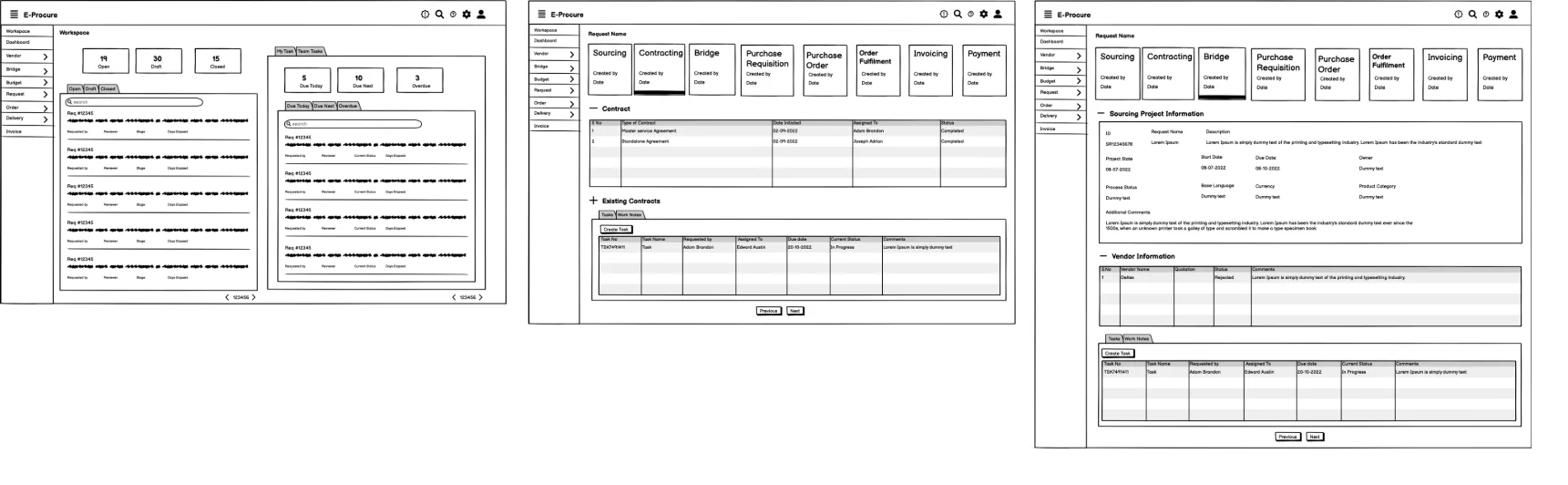
Information architecture, flows and wireframes
01
Information architecture
I defined a structure that lets requesters, buyers and approvers find what they need without training.
02
User flow
I traced how a purchase request travels from creation to approval, which showed where automation removes manual hand-offs.
03
Wireframing & UX strategy
I explored several flows in low-fidelity wireframes and refined them over multiple usability rounds. A design system then secured consistency.
Key stage 03
Designing, testing and shipping with the team
The design
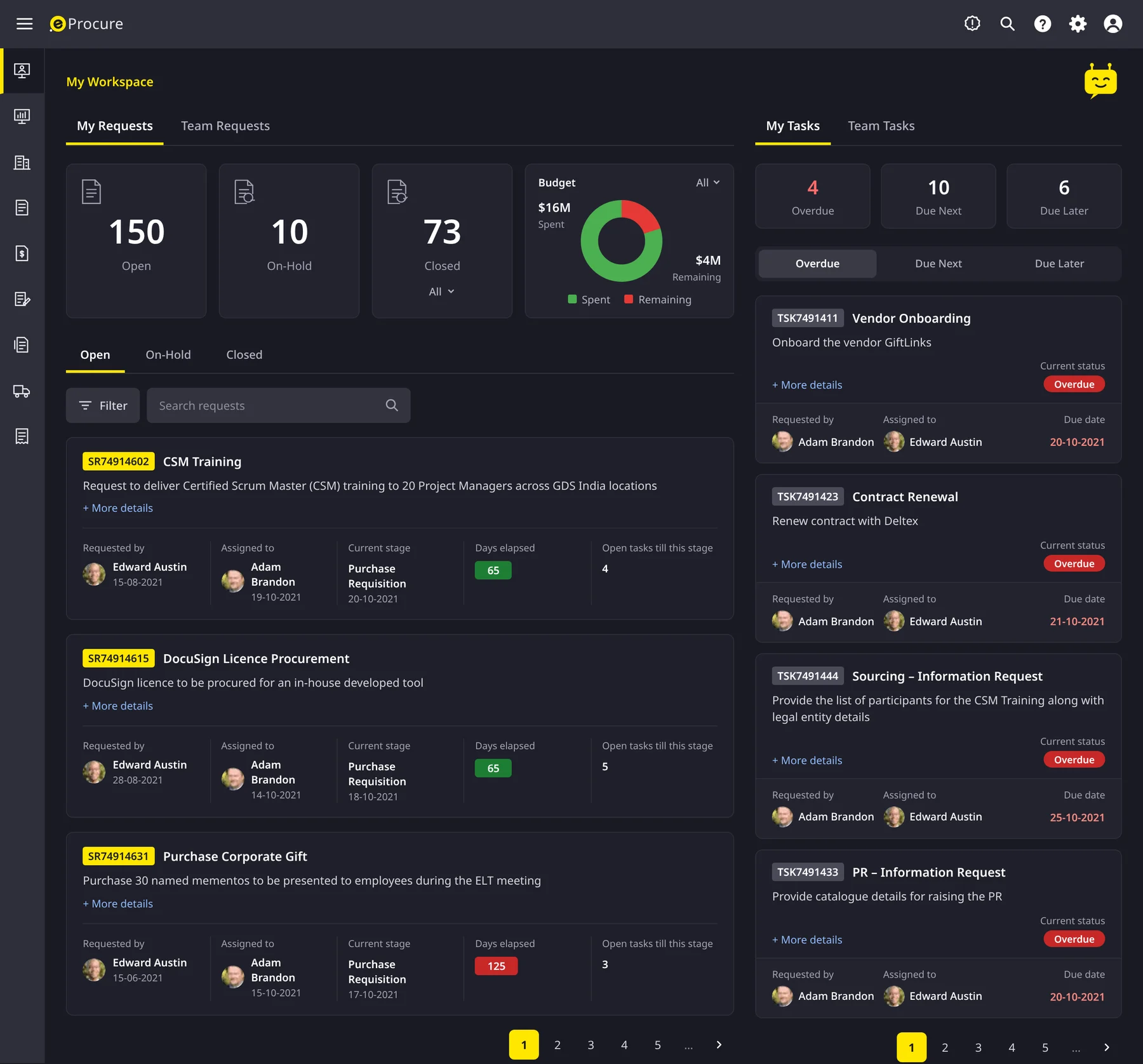
I tested interactive prototypes with procurement teams before any code was written. The workspace prioritises real-time tracking, budget and tasks, and every request carries one stage tracker from sourcing to payment, with accessibility built in.
How we worked
I worked alongside the developers throughout the build and ran design QA, so the shipped product remained true to the UX intent.
I partnered with QA to validate usability and feed testing findings back into the product.
How the product works
Step 01
My Workspace
Every requester and buyer starts here. The screen shows open, on-hold and closed requests, budget spent against the amount remaining, and tasks split into overdue, due next and due later. Users no longer need to ask where something stands.
Step 02
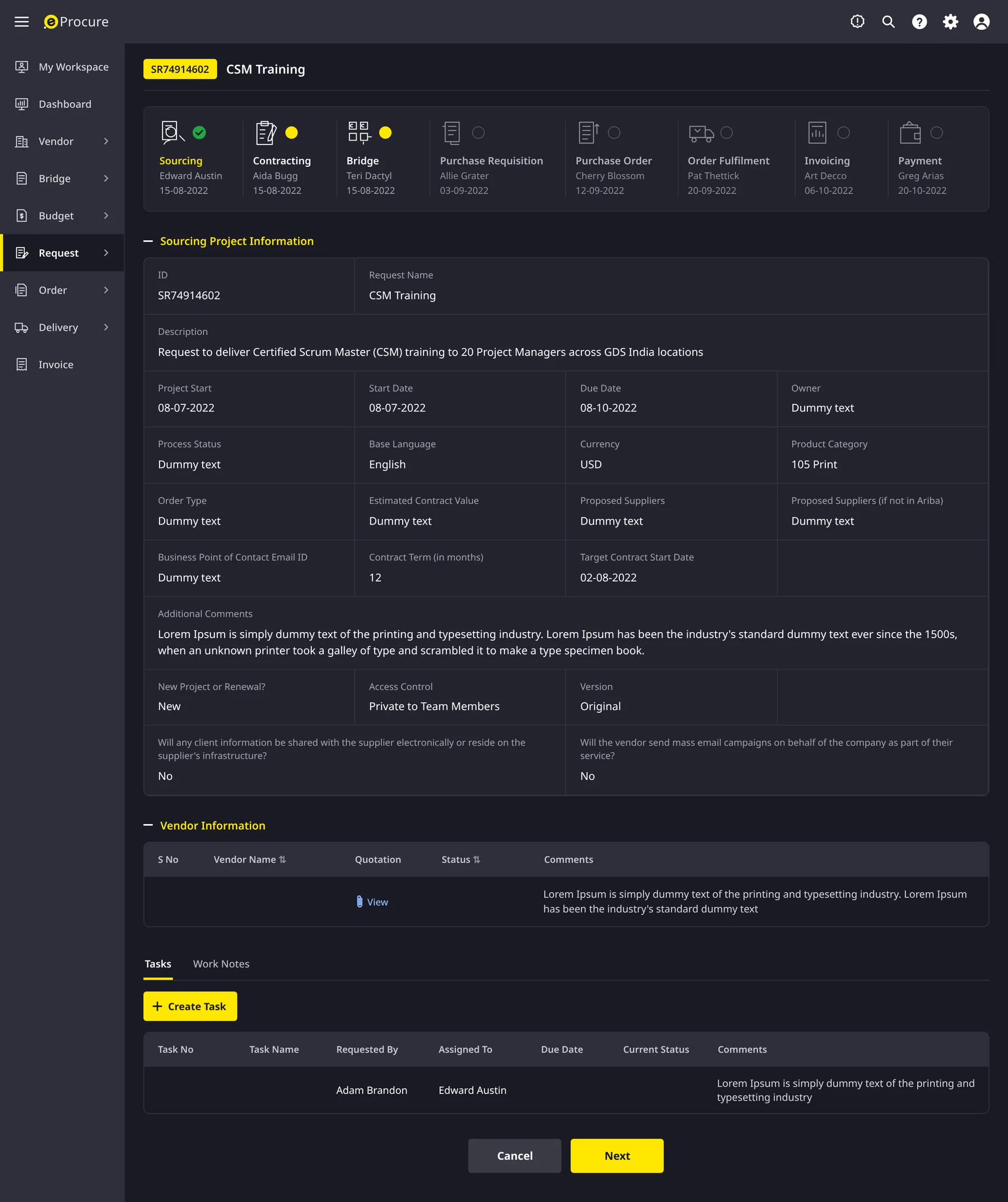
One timeline for the whole purchase
Each request carries an eight-stage tracker covering sourcing, contracting, bridge, requisition, order, fulfilment, invoicing and payment, with the owner and date of every stage. The sourcing details, proposed vendors and their quotations appear below it.
Step 03
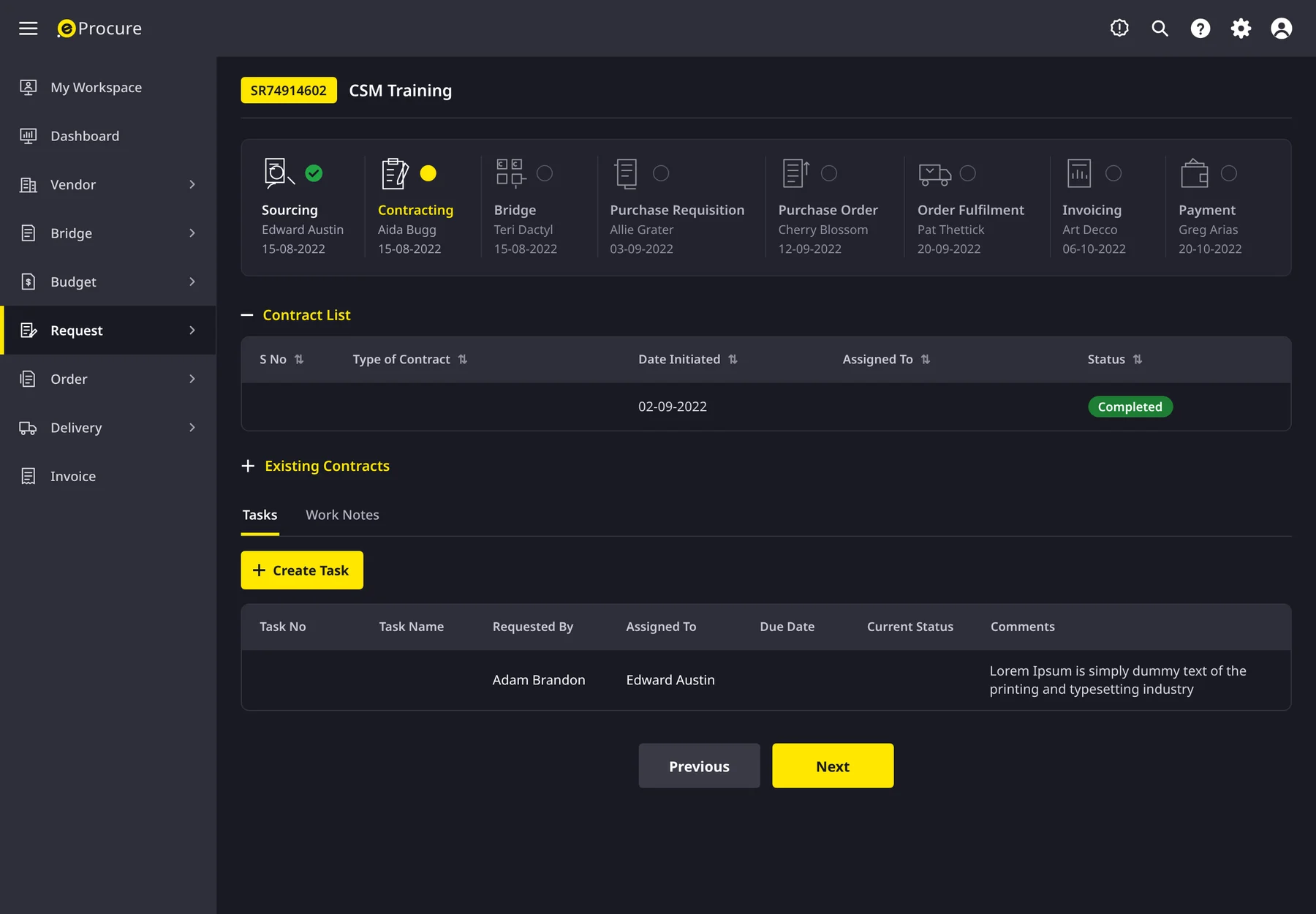
Contracting without the email thread
The contracting stage lists every contract with its status and links existing contracts. Tasks and work notes remain on the request itself, which keeps hand-offs between sourcing and legal visible.
Step 04
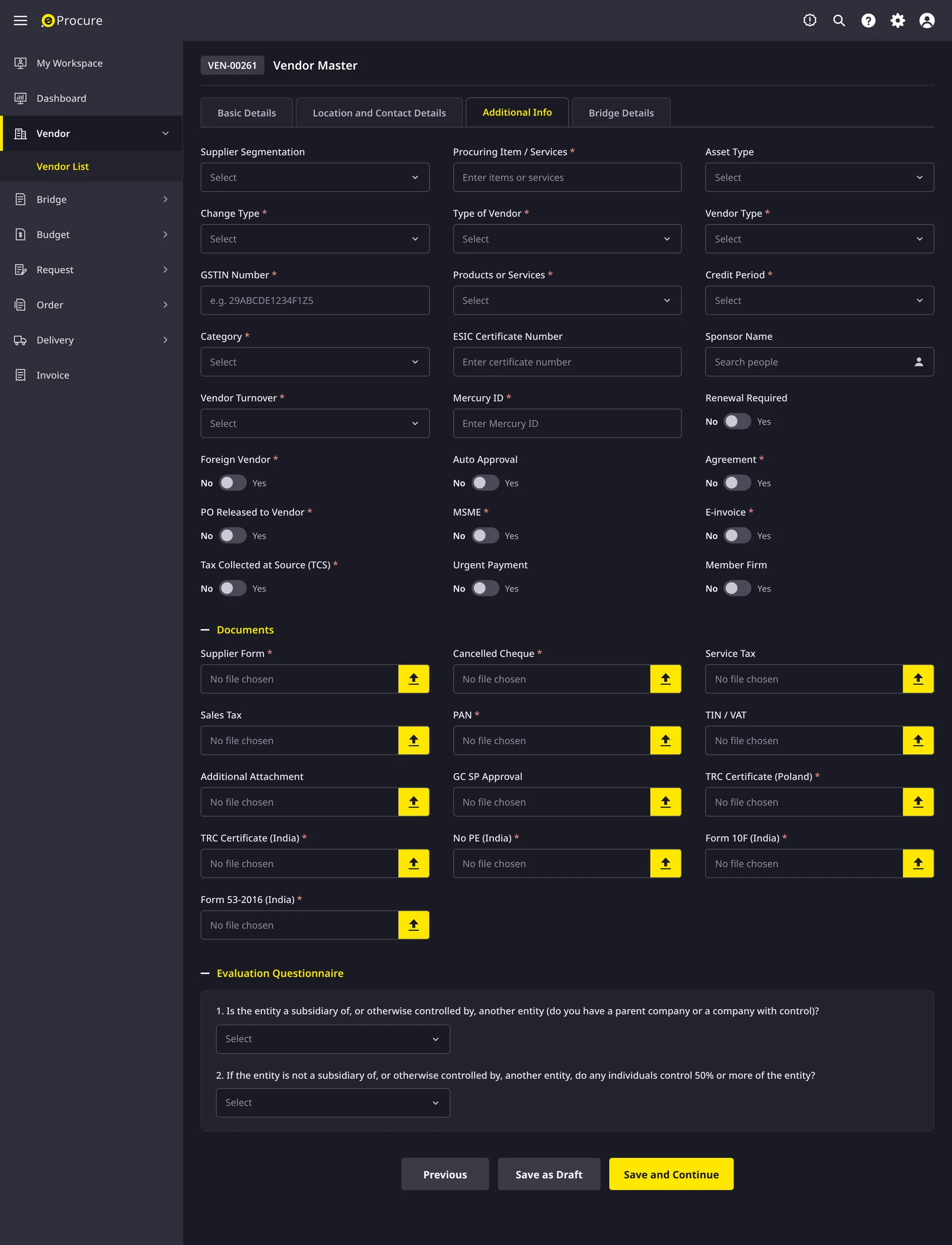
Onboarding a vendor
The vendor master captures registration, tax and compliance details once, across four tabs. Yes or no questions are switches, every required document has its own upload slot, and an evaluation questionnaire records ownership and control.
Step 05
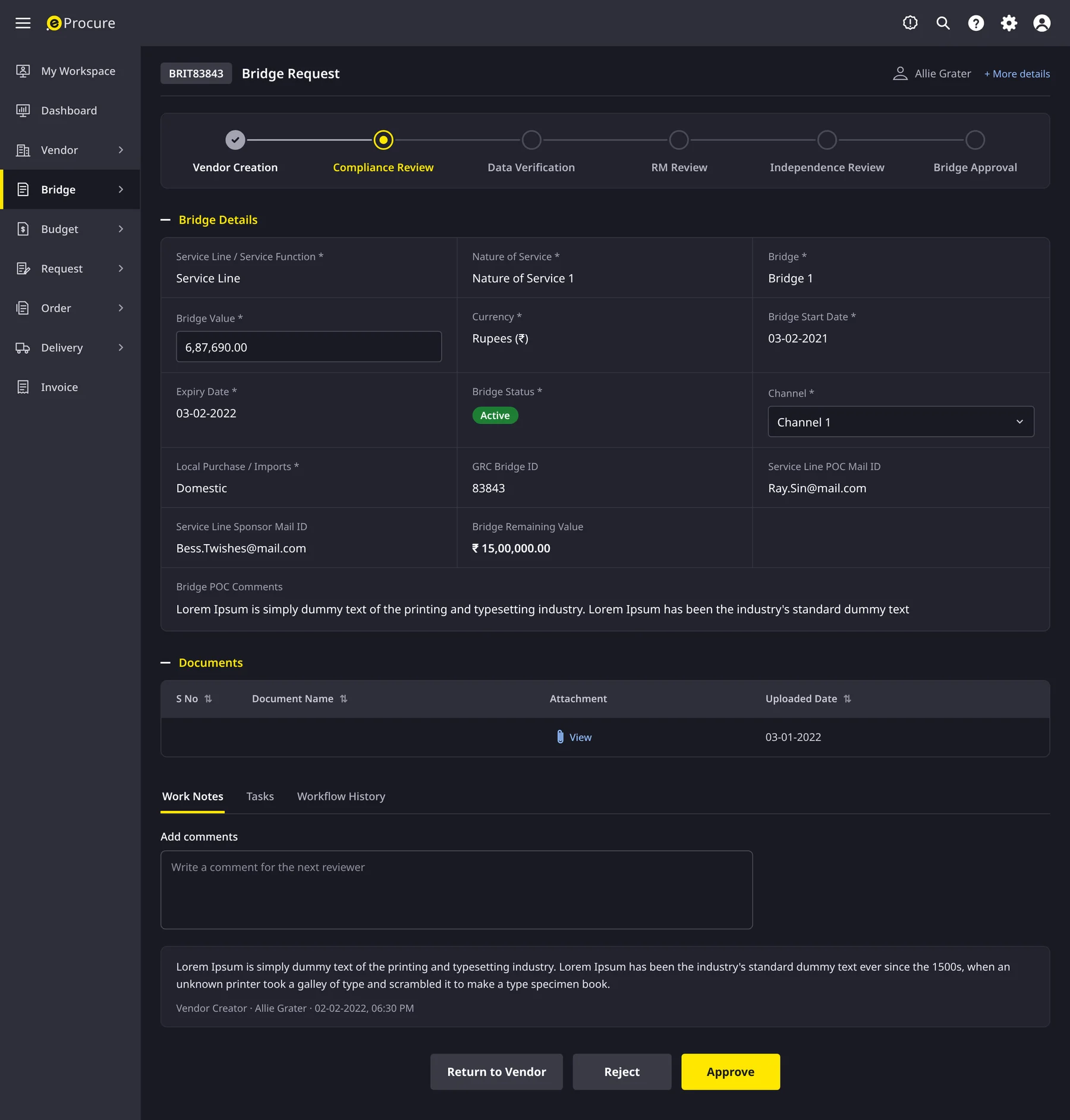
Approving with the full picture
A bridge request passes through six reviews, from vendor creation to bridge approval. Reviewers see the bridge value, dates, status and remaining value, along with the documents and earlier comments, and can approve, reject or return the request to the vendor.
Step 06
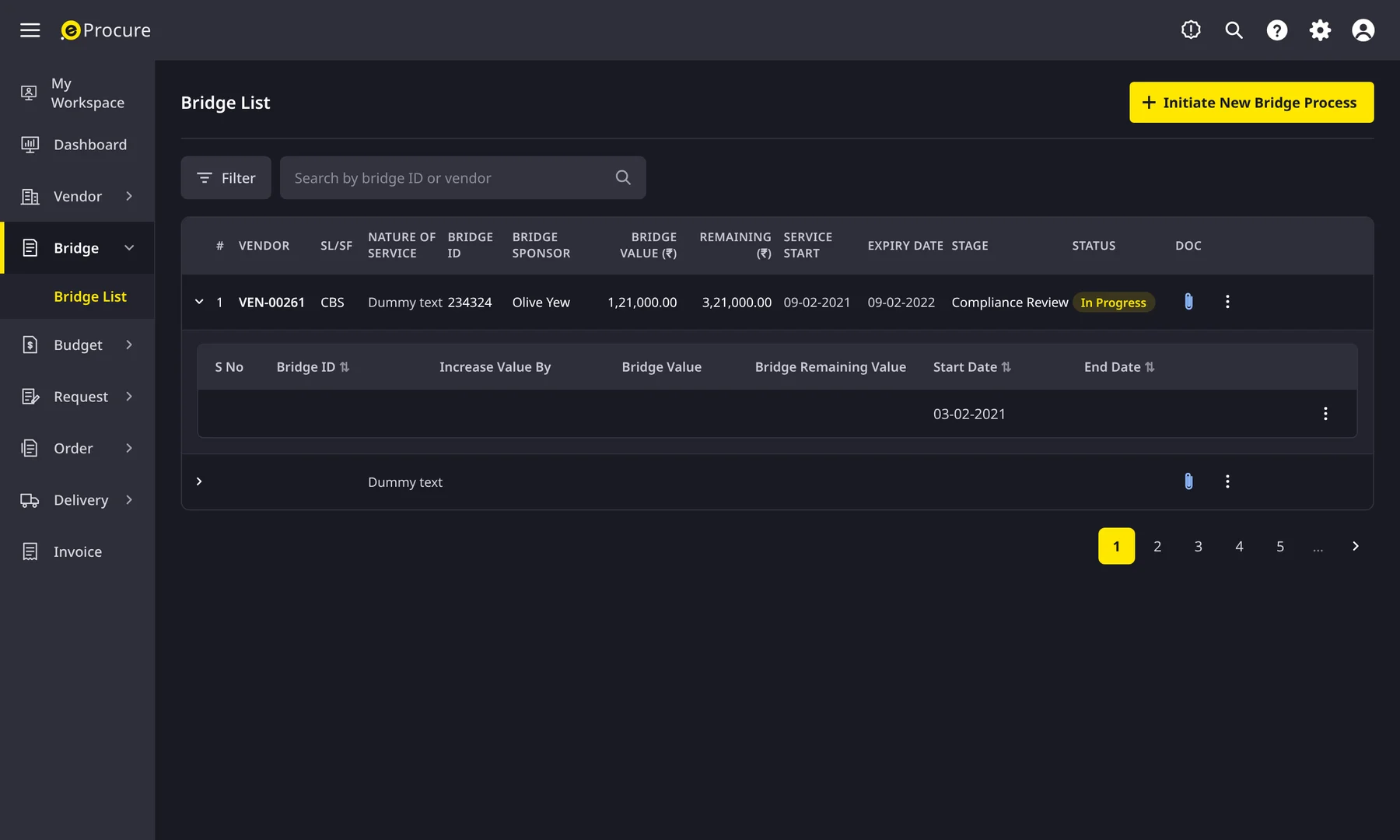
Tracking every bridge and its top-ups
The bridge list shows each bridge's value, remaining value, expiry, stage and status. Rows expand to show every increase, so finance can see how a bridge has grown before approving more.
Step 07
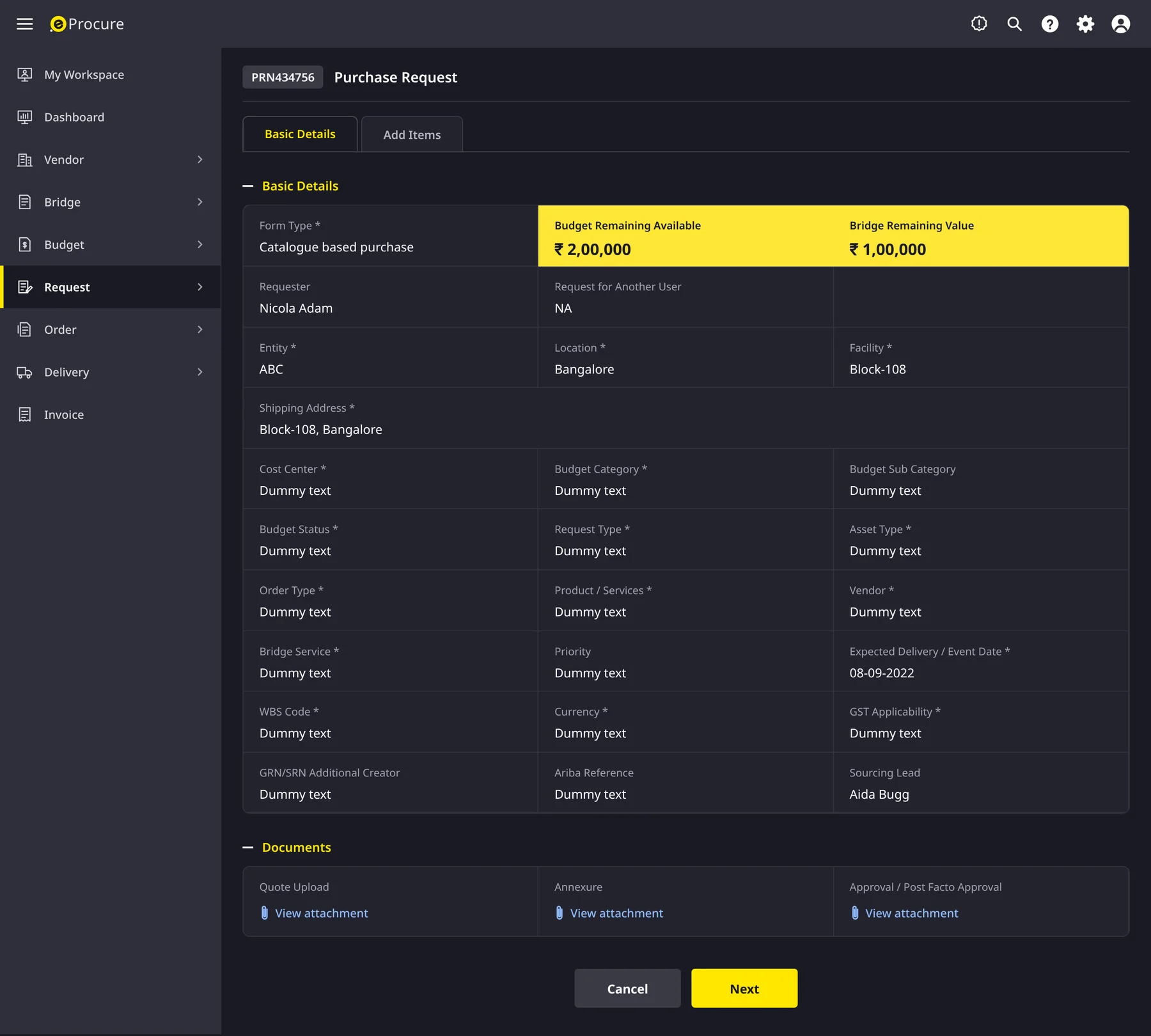
Raising a purchase request
The request form opens with the budget and bridge value still available, so requests that would overrun are caught at the start rather than in finance. Quotes, annexures and approvals attach in the same place.
Step 08
Watching spend against budget
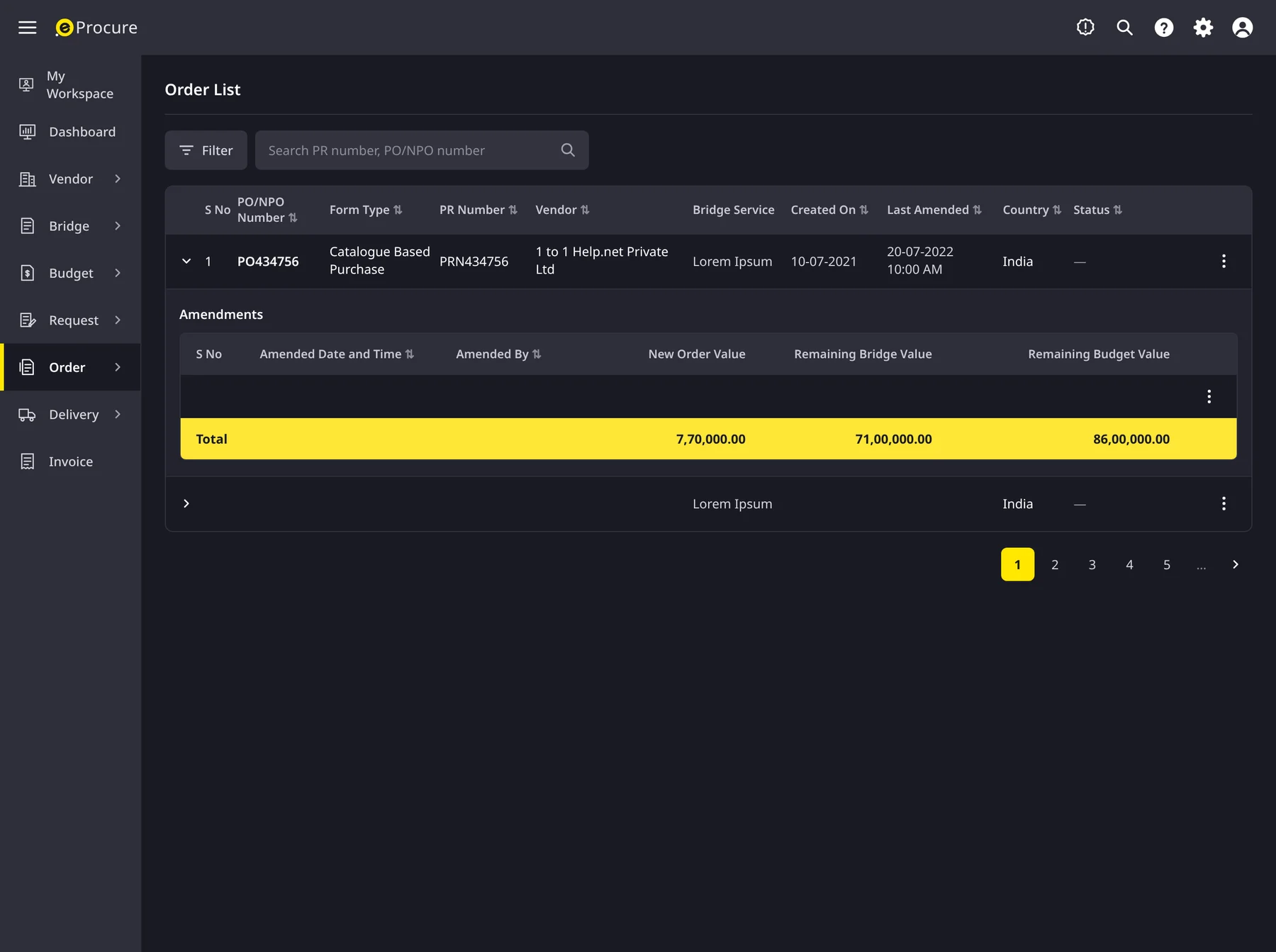
The order list keeps every amendment with who made it and when. It totals the new order value against the remaining bridge and budget, so finance can see consumption as it happens rather than at month end.
Collaboration
How the team worked together
The team comprised a project manager, two business analysts, a second designer, six developers and QA. Most design decisions were therefore made in the room with the people who would build and test them.
Project Manager
We set the release plan together, module by module, so that research on vendor management ran while the requisition module was in build.
Business Analysts
They owned the approval rules and policy constraints. We rebuilt the user flow together twice after they surfaced routing cases that the first version had missed.
UX Designer (second)
They took on the vendor and contract areas once the design system was in place, and weekly critiques kept both halves consistent as one product.
Developers
We reviewed component by component during the build, and I completed a design QA pass on every sprint demo before anything was marked done.
QA Engineers
I shared the usability test scripts so that their functional tests covered the real journeys, and they fed their defect patterns back into the flows.
Where the team changed the design
The biggest change of direction came from the business analysts rather than from research. Their walkthrough of exception cases showed that a single approval path would not hold, which is why routing rules became visible to users instead of hidden in the system.
Paths not taken
What we considered and set aside
Before committing to a new procurement workspace, we weighed three lower-cost alternatives. Each failed the same test: would requesters stop following up on approvals by email?
Option 1
Configure the existing ERP procurement module
Why it was temptingLowest build cost and already licensed.
Why we set it asideIts approval chains could not be shown to requesters, and the vendor data model had no room for performance history, which was the very problem we were hired to solve.
Option 2
One universal request form for every purchase type
Why it was temptingSimpler to build and to explain.
Why we set it asideIn testing, requesters abandoned long forms containing fields that did not apply to them. We moved to a short core form with type-specific sections instead.
Option 3
Approvals handled entirely by email notifications
Why it was temptingNo new screens to learn, since people already worked in their inbox.
Why we set it asideIt reintroduced the follow-up problem we were removing. Approvals therefore moved into the workspace, with email used only as a reminder.
Outcome
From the first day, the launch changed how procurement teams worked.
30%
Faster purchase approvals
40%
Less manual work
60%
Increase in user adoption
Before e-Procure, I spent hours chasing approvals. Now it happens automatically.
Procurement Manager
Vendor selection used to take weeks. With real-time insights we finalise deals in days.
Finance Director
Learnings & next steps
What I would carry forward
What I learned
01
Transparency proved to be the real product. Once vendor data was in one place, most approval delays disappeared without any new approval feature.
02
Automation earned trust only once the rules were visible. Showing why a request was routed to a given destination mattered as much as routing it.
03
The design system repaid its cost in the second module. With shared components, the vendor and contract areas shipped in half the time of the first.
Next steps
→
I would instrument the dashboard to learn which insights procurement managers act on, and remove those they do not.
→
I would extend the vendor hub to supplier self-service, so that each supplier enters onboarding data once.
→
I would run a second adoption study six months in, to confirm whether the 60% lift holds as new teams join.