An intelligent scheduling tool that replaces manual coordination with balanced workloads and real-time visibility.
RoleLead UX Designer
Duration5 months
TeamProject Manager, Business Analysts, 2 Designers, 4 Developers, and QA Engineers
SectorProfessional services · Tax & Advisory
The problem
Manual scheduling caused double bookings, uneven workloads and missed meetings.
My contribution
Led user research, workflow architecture, wireframes and prototypes, with a focus on driving adoption.
The result
40% better meeting efficiency, with fewer missed appointments and lower manager workload.
Impact at a glance
The tool delivered measurable gains in efficiency, productivity and satisfaction.
The Client Collaboration Tool is a client meeting scheduling solution. Coordinating meetings is often difficult because of scheduling conflicts and miscommunication, so the tool was designed to simplify coordination, reduce manual effort and save time for the teams and clients involved.
40%Better meeting efficiency
FewerMissed appointments
HigherClient happiness index
Key stage 01
Understanding the problem
The challenge
Scheduling was managed manually, which led to frequent double bookings and uneven workloads, and these in turn caused delays. The process required several steps and a high level of administrative effort, and the absence of real-time alerts meant that meetings were sometimes missed.
Manual scheduling Availability was held in individual calendars, so double bookings and conflicts were routine.
Workload imbalance Meetings were not distributed evenly, which placed a few people at the centre of every service bottleneck.
Too many steps Booking a single meeting required a chain of emails, calls and calendar edits.
Poor visibility Weak reminders and the absence of a shared view led to meetings being missed or forgotten.
What I did
I conducted in-depth interviews and surveys to identify pain points in the existing scheduling workflows.
I defined personas and journey maps to keep the product grounded in real user needs.
Together with stakeholders, I balanced business goals, user expectations and technical feasibility.
Primary goal
Reduce finding a mutually free slot to a single step.
Personas and context
Michael Turner
Tax Manager
Primary user
He is an experienced tax manager who values his client relationships. Timely meetings are how he gives advice, resolves compliance questions and builds trust.
Pain points
Schedules clash across multiple calendars.
Cancellations and reschedules disrupt the rest of the week.
Keeping clients informed about agendas, reminders and documents.
Preparing agendas, minutes and action items after every meeting.
Goals
Find free slots quickly and avoid conflicts.
Spend his time on tax work rather than calendar administration.
Communicate with clients clearly and on time.
Keep meeting documents and notes in one place.
Lucas Ferreira
Finance Manager, consumer goods client
Client user
Lucas is the client-side contact for his company's tax matters. He needs to know what is due, what has been filed and when he can reach the tax team by phone, without following up with anyone by email.
Pain points
Tax status updates arrive by email and are difficult to find later.
Booking a meeting requires several messages back and forth.
No single place shows open requests and their deadlines.
He cannot tell whether the firm has acknowledged a document.
Goals
See the tax status for every year in one view.
Book a meeting or conference call in a few taps.
Receive a notification when a service is due or a filing is complete.
Acknowledge requests and share documents from his phone.
Key stage 02
Defining the structure before screen design
What we decided to build
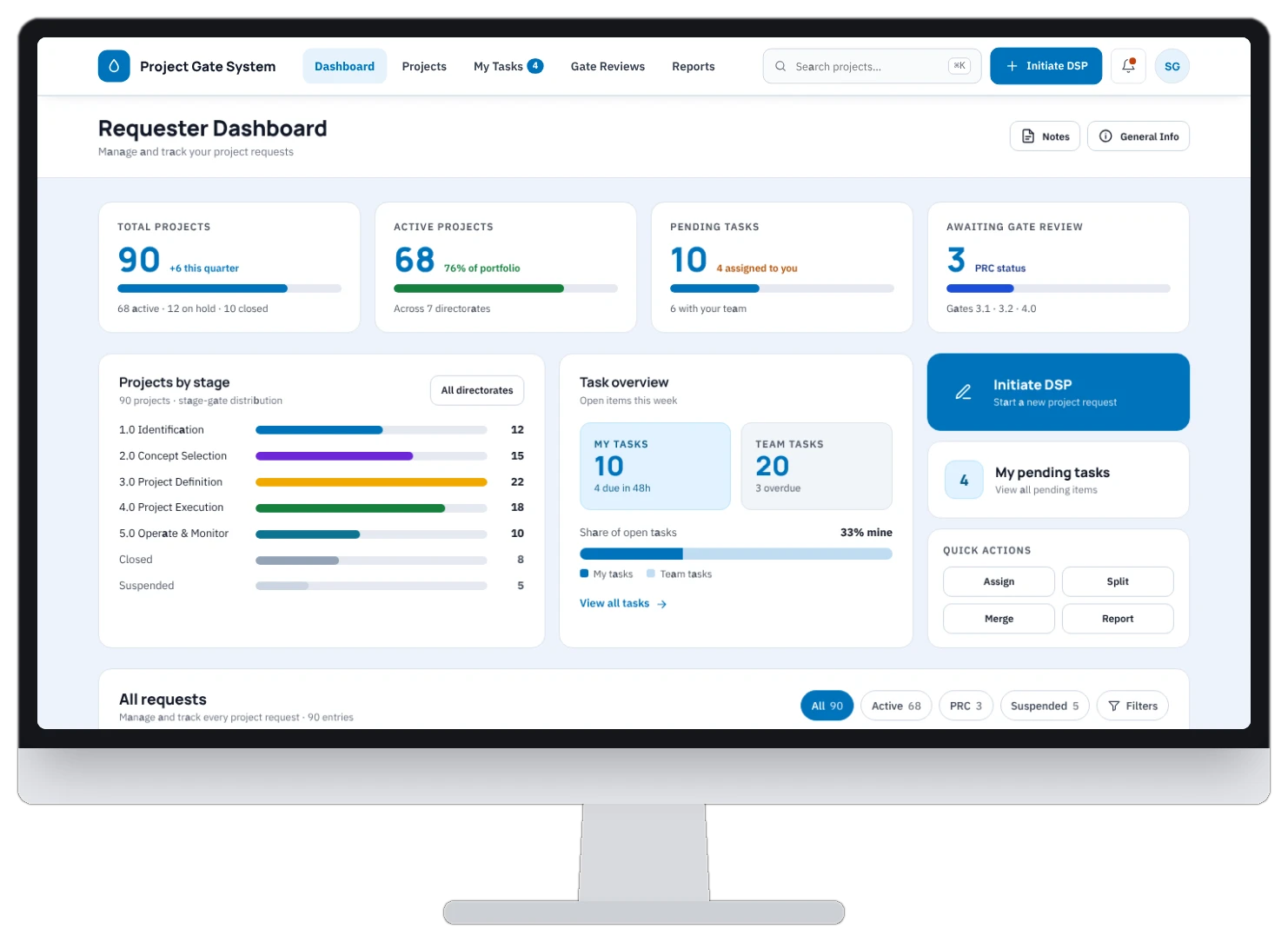
The tool combines an intuitive interface with scheduling logic that identifies the best available time slots and resolves conflicts automatically. A real-time dashboard shows upcoming meetings, and automated notifications keep stakeholders informed. Together these significantly reduced scheduling errors and manual coordination, and improved meeting efficiency.
Simple, intuitive interface Clear navigation that busy professionals can adopt with minimal learning.
Automated scheduling Intelligent algorithms identify the best slots, prevent conflicts and balance the workload.
Real-time dashboard A single view of upcoming meetings, team schedules and capacity.
Instant notifications Automatic reminders and updates ensure that no one misses a meeting.
My role in this stage
As lead UX designer, I focused on driving adoption of the tool. My responsibilities covered user research and strategy, workflow architecture, wireframes and high-fidelity prototypes, and collaboration with product and engineering through to delivery.
Information architecture, flows and wireframes
01
Information architecture
I designed a structure in which people find everything easily and become familiar with the product quickly.
02
User flow
I mapped how a client meeting is requested, matched to availability, confirmed and followed up.
03
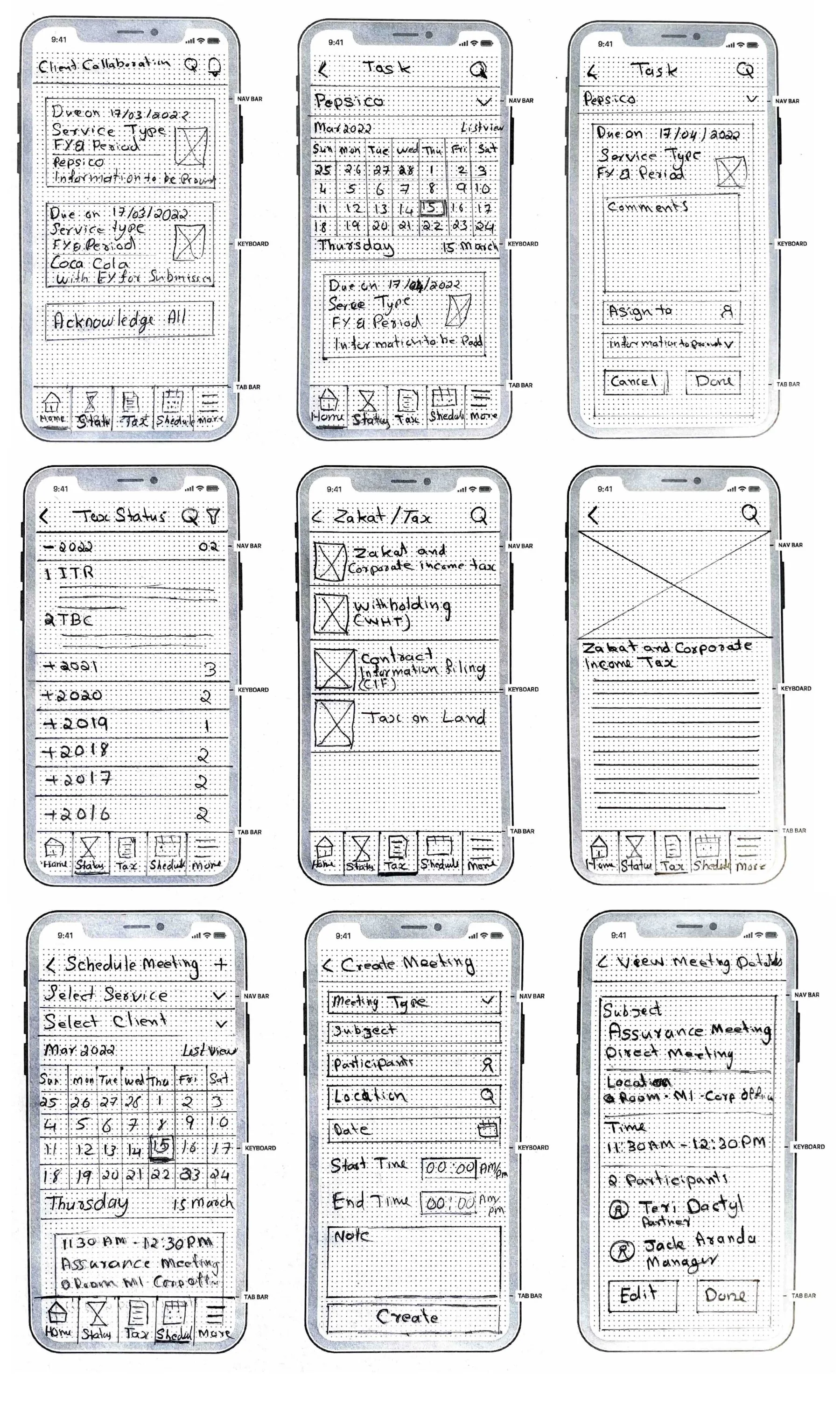
Low-fidelity wireframes
Early screens allowed me to test the core scheduling flow with users before visual design began.
Key stage 03
Designing, testing and shipping with the team
The design
I then combined the dashboard, scheduling and notification flows in high-fidelity prototypes, which we used to assess usability with tax and advisory staff.
How we worked
I provided engineering with detailed design documentation and interactive prototypes to support a smooth build.
I worked closely with product managers and stakeholders to keep design decisions aligned with business objectives.
I supported QA as the team validated user flows and refined the final interactions.
How the product works
Step 01
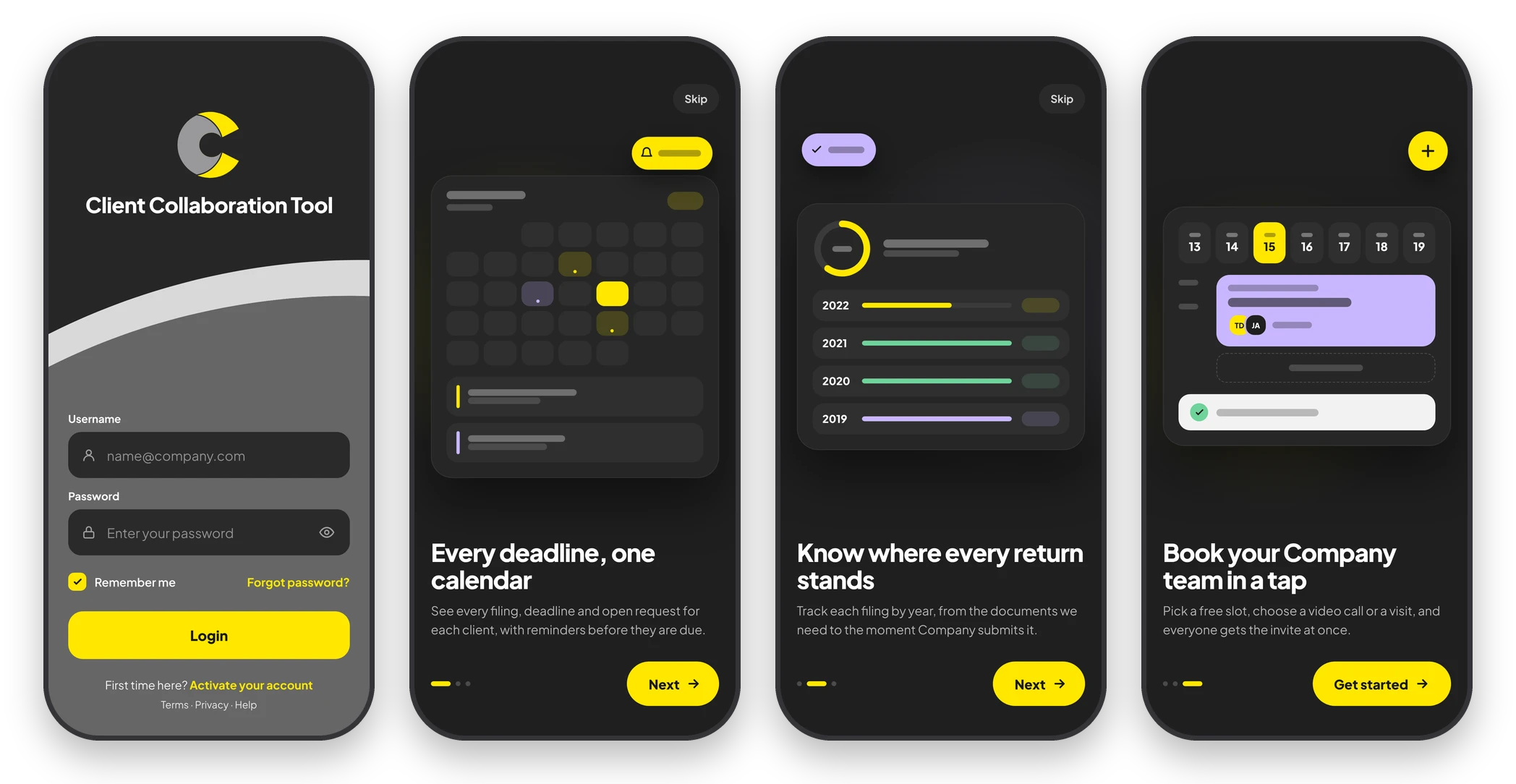
Login and three-card welcome
Login requires only two fields, remembers the user, and keeps password reset and account activation one tap away. First-time users then see three short cards covering every deadline on one calendar, where each return stands, and how to book the advisory team in a tap. Any card can be skipped.
Step 02
Start from what needs attention
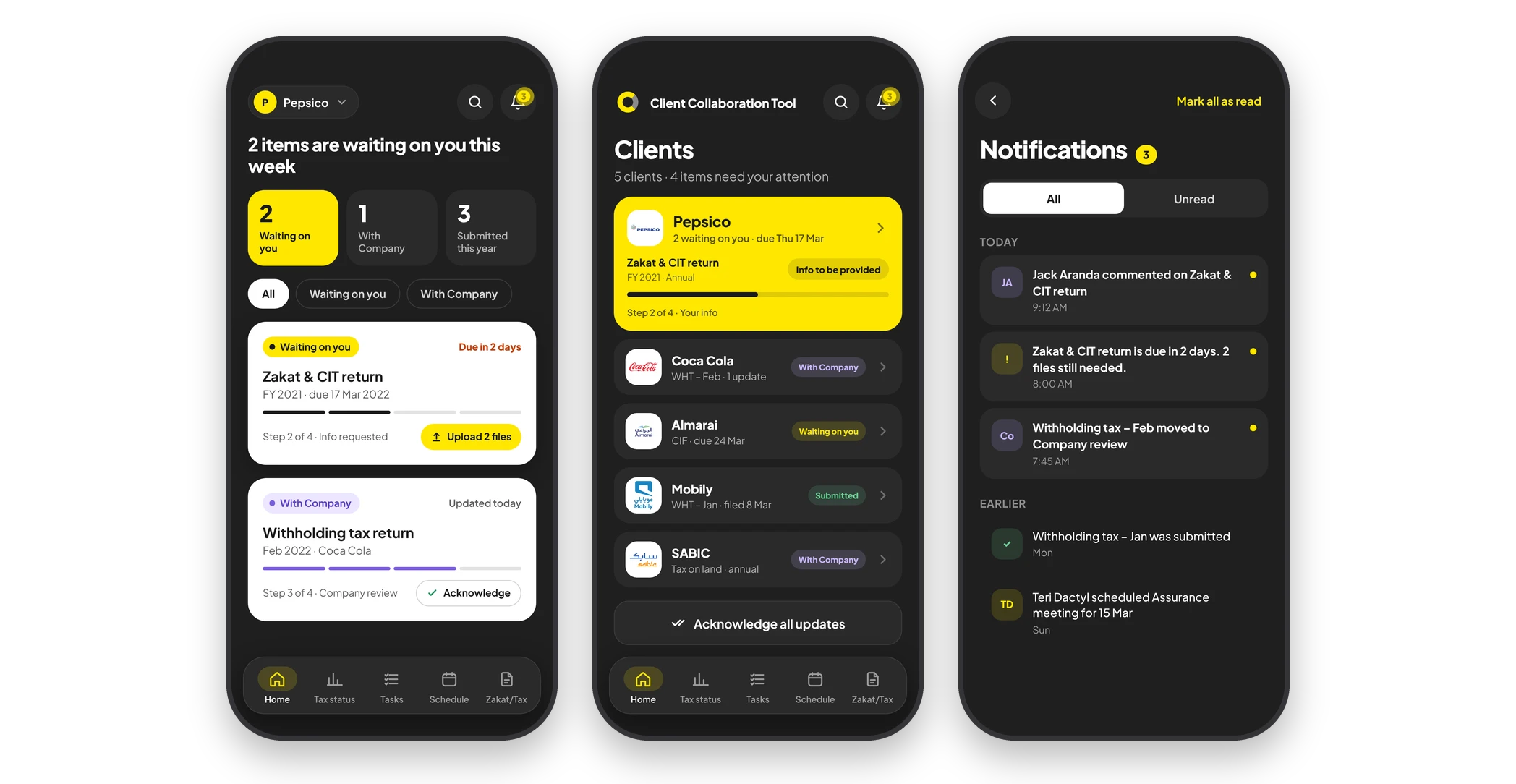
The Clients home lists every client with their next filing, its step and a status tag, and places the client needing action at the top. Each client dashboard counts what is waiting on the client, what is with the advisors and what has been submitted this year. Every filing card shows its single next action, such as uploading files or acknowledging an update. Notifications gather comments, due-date reminders and status changes, with all and unread views.
Step 03
Tasks from calendar to completion
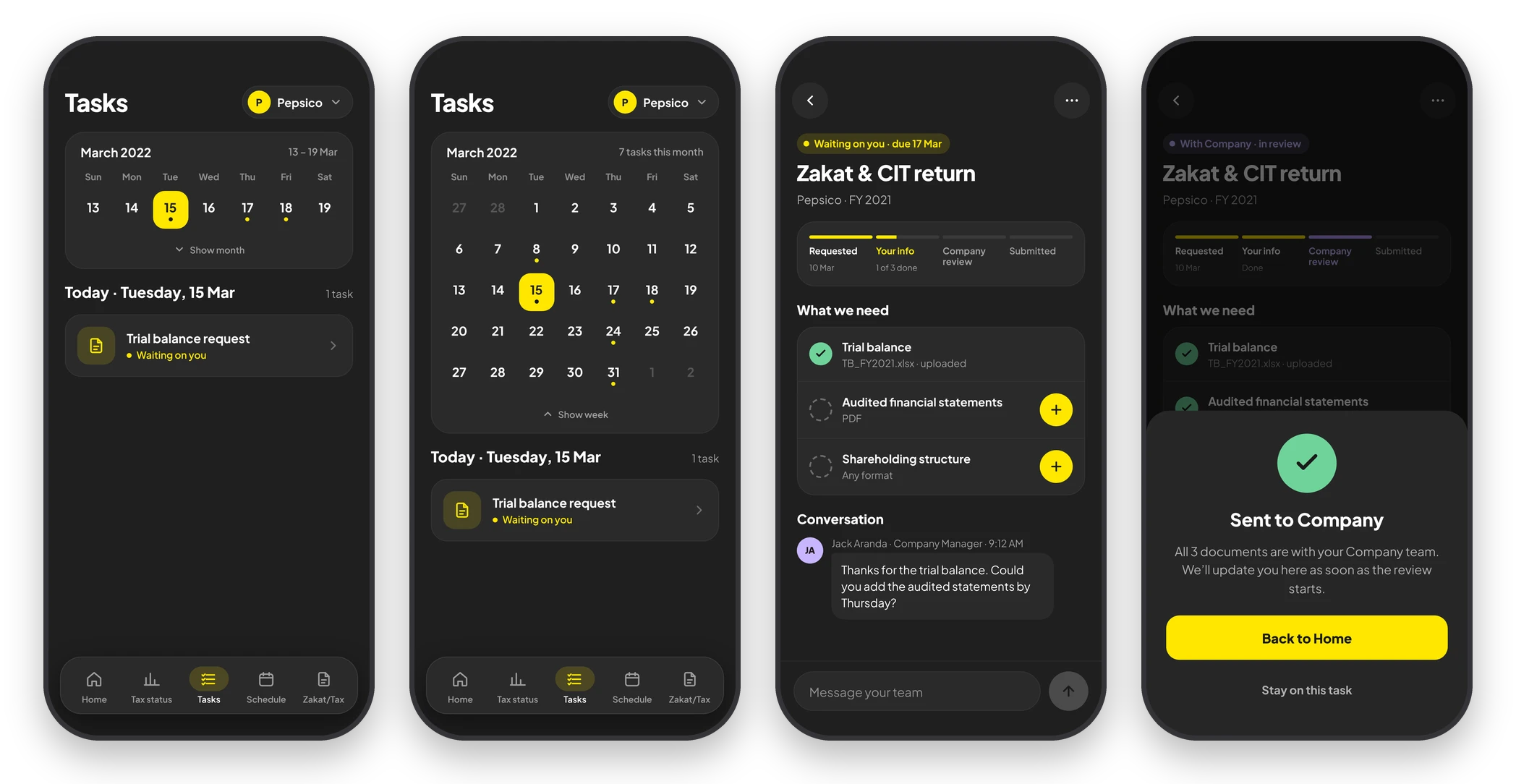
Tasks open on a week strip that expands to the full month, with a dot marking each day on which work is due. A task shows its four steps from requested to submitted, a checklist of outstanding documents with upload buttons, and the conversation with the advisor. Once the last document is sent, a clear confirmation tells the client that nothing else is expected.
Step 04
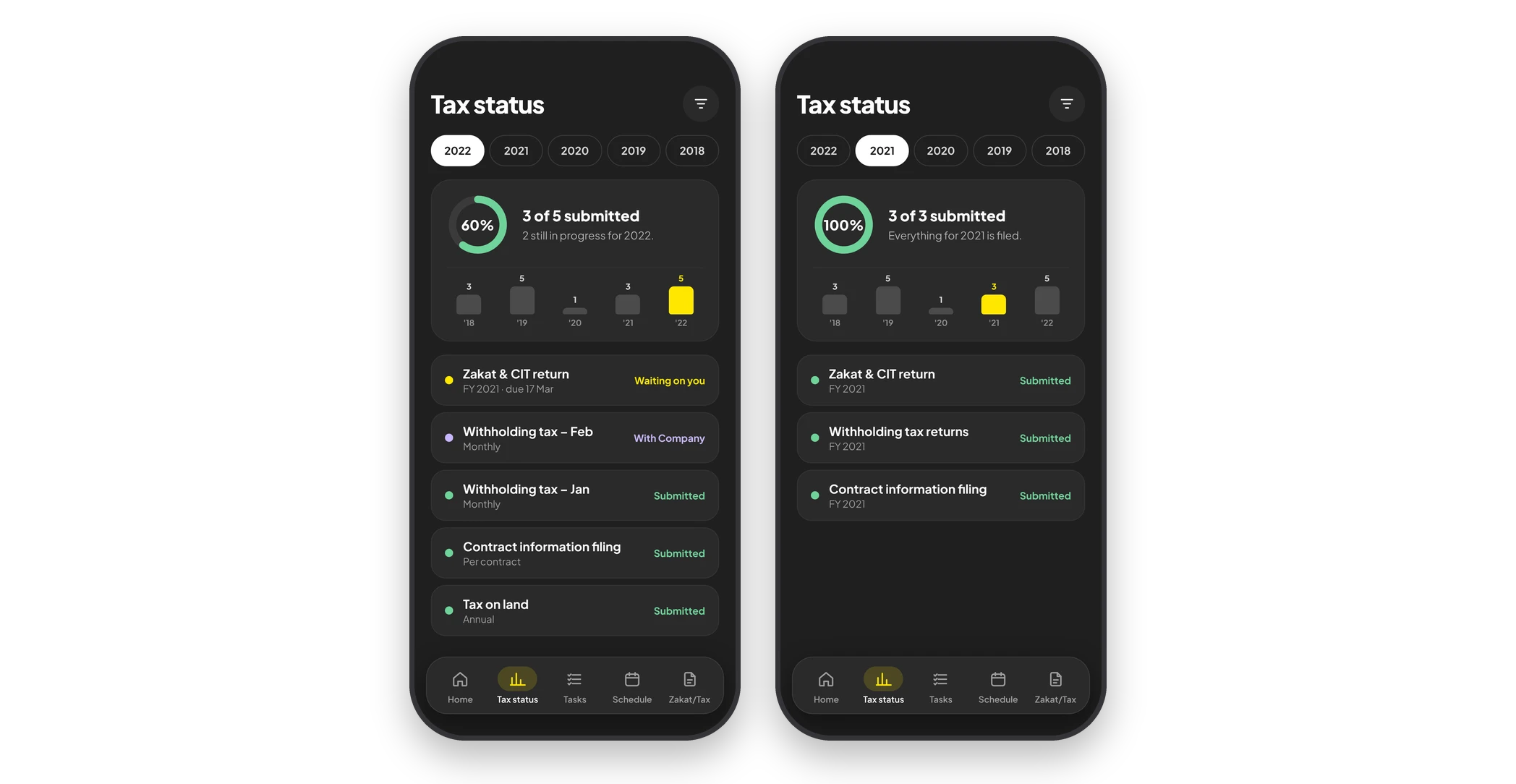
Tax status by year
Year tabs switch between filing years. A progress ring shows how many returns are submitted, a small chart compares the years, and each filing below shows its status. Clients can therefore answer their own questions about past returns.
Step 05
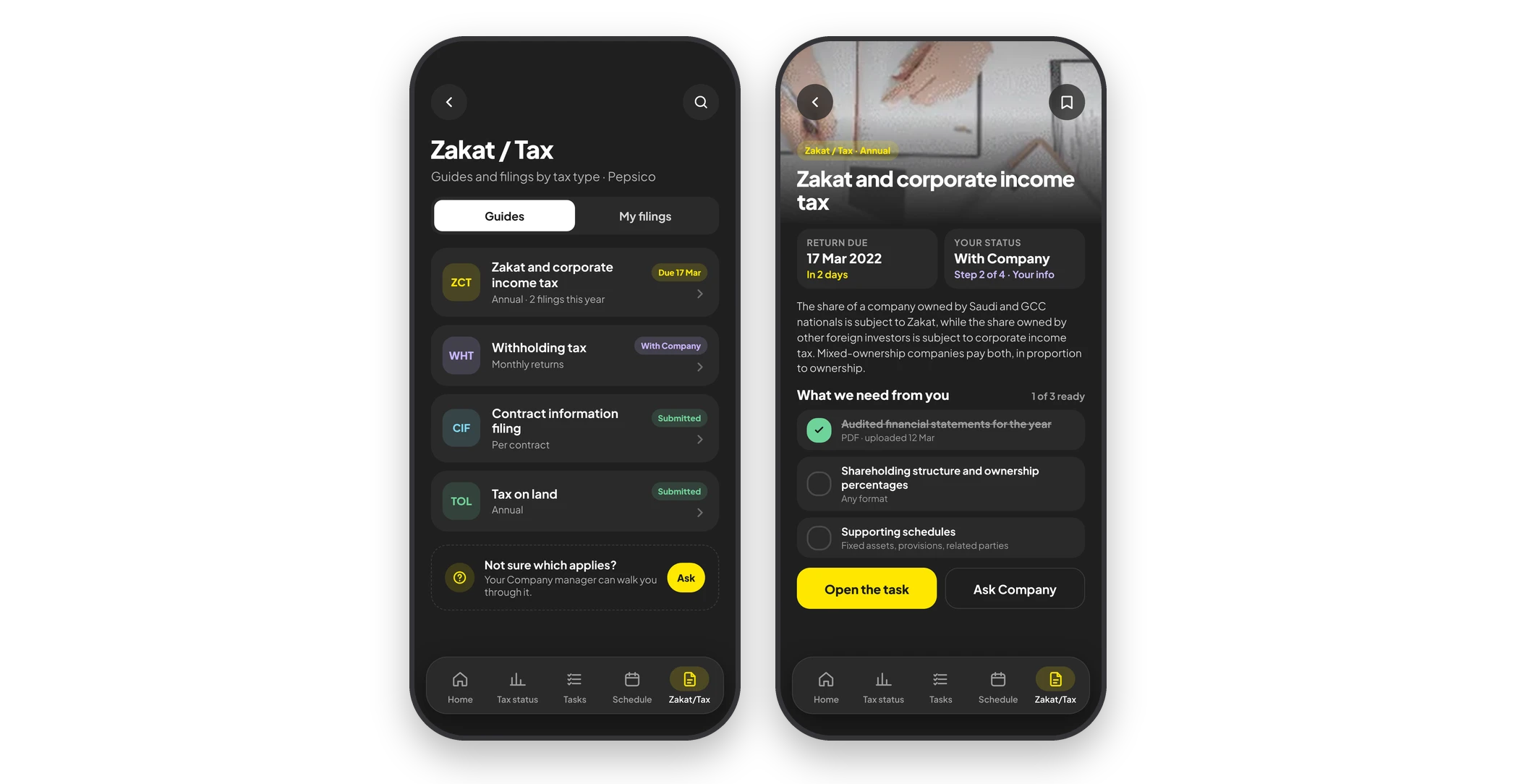
Plain-language guidance by tax type
A Zakat / Tax switch moves between the guides and the client's own filings, with due dates and status on every row. Each guide explains the obligation in plain language, shows the return due date and the client's current step, and lists what the advisor needs. It also links directly to the open task or to a request to the team.
Step 06
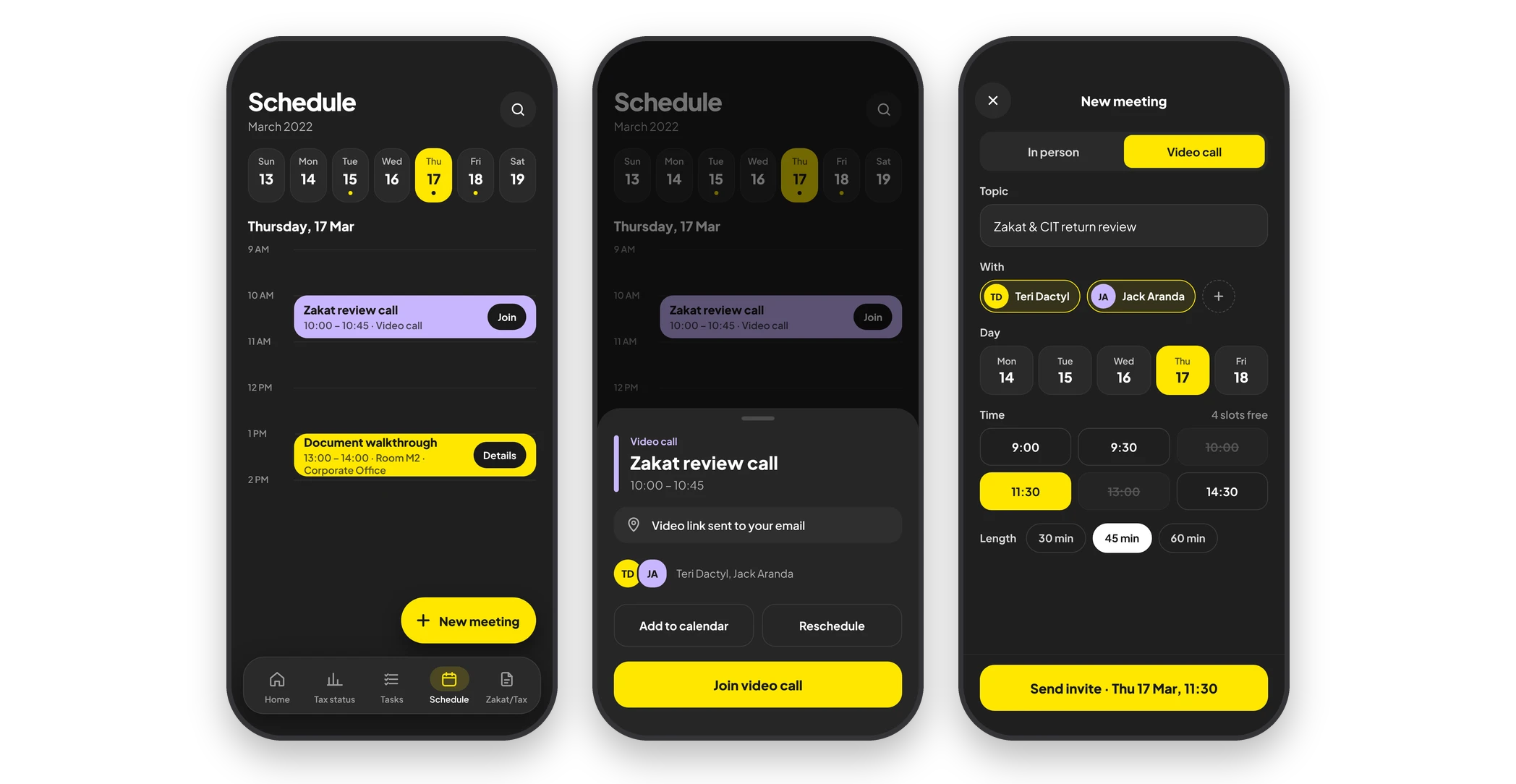
Meetings without email back-and-forth
Schedule shows the week and a timeline of the day's meetings, with Join and Details on each. Opening a meeting brings up a sheet with the video link, attendees, add to calendar and reschedule options. To book a new meeting, the user chooses in person or video, then the topic, attendees, day, free time slot and length, and sends the invite.
Collaboration
How the team worked together
With two departments, two designers and a four-person development team, the scheduling logic was negotiated as much as it was designed.
Project Manager
Framed the scope around the two departments with the most scheduling pain, which kept the first release focused.
Business Analysts
Mapped the tax and advisory booking rules; the resulting matrix of who can book whom became the basis of the matching logic.
Second Designer
Owned the mobile screens while I led the flows and desktop views, with shared components keeping us aligned.
Developers
Used interactive prototypes instead of lengthy specifications for the scheduling flow, and tuned the matching behaviour with us during the build.
QA Engineers
Tested every booking path against the prototype before release, including the conflict and reschedule cases.
Where the team changed the design
Advisory partners joined the usability sessions as observers. Seeing managers struggle with workload imbalance first-hand moved the balance view from a desirable extra into the first release.
Paths not taken
What we considered and set aside
Before building a scheduling product, we discussed three quicker fixes. None addressed workload balance, which was the problem partners actually raised.
Option 1
A shared calendar overlay on the existing email suite
Why it was temptingNo new product, and the fastest possible launch.
Why we set it asideIt resolved double bookings but not workload balance or request tracking, the two issues partners cared about most.
Option 2
Fully automatic assignment with no manual override
Why it was temptingRemoves all scheduling effort.
Why we set it asideManagers would not trust assignments they could not adjust. In the final design, the tool proposes a match and the manager confirms or changes it.
Option 3
One identical flow for every department
Why it was temptingOne flow to design, build and support.
Why we set it asideTax and advisory required different approval steps, and imposing one flow on both would have repeated the adoption failures of earlier tools.
Outcome
The tool delivered measurable gains in efficiency, productivity and satisfaction.
40%
Better meeting efficiency
Fewer
Missed appointments
Higher
Client happiness index
Lower
Manager workload
A higher client happiness index, resulting from more streamlined scheduling.
Managers gained visibility of team performance and work distribution.
Reduced time on client calls, with faster and more effective communication.
A lighter workload for managers and better real-time data.
Meetings were scheduled and closed faster, with far less manual effort.
Learnings & next steps
What I would carry forward
What I learned
01
Workload balance proved to be the hidden requirement. Partners cared less about finding a slot than about who kept receiving the slots.
02
Notifications needed to be few and specific. My early prototypes sent too many, and users switched them off within a week.
03
Two departments meant two workflows, so a single rigid flow would have failed. Configurable steps for each department made adoption possible.
Next steps
→
I would connect the tool to the firm's document system so that meeting notes and files sit with the booking.
→
I would add a client-facing view in which clients can propose and confirm times without email.
→
I would track time-to-schedule and no-show rate for each department as standing metrics.